

Families comparing Amazon Echo and Google Nest are choosing more than a speaker: they are choosing how household members control lights, answer questions, manage routines, and interact with connected devices. Echo is the stronger starting point for households that want broad hardware choice, Alexa skills, and customizable routines. Nest is a natural match for families already using Android phones, Google Calendar, or Google Home cameras and thermostats. Neither platform is automatically child-proof or private by default, so parents should weigh controls and household habits alongside convenience.

Turn the school run and nap time into listening time
- Thousands of audiobooks, podcasts and originals
- Listen on your phone, tablet or Echo — also offline
- Cancel anytime

Echo Hub (8") – Redesigned Smart Home Control Panel with Customizable Dashboard and Alexa+
- ✔ Display: 8-inch touchscreen, 1280 × 800
- ✔ Power: USB-C PD or PoE/PoE+ and PoE++
- ✔ Audio: Stereo pair of top-ported full-range speakers
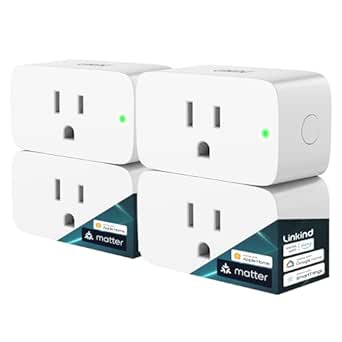
Linkind Matter Smart Plug, Work with Apple Home, Alexa, Siri, Google Home
- ✔ Pack quantity: 4
- ✔ Plug type: Type A
- ✔ Power capacity: 1800 W

Echo Dot – Deep Sea Blue
- ✔ Dimensions: 3.9 × 3.9 × 3.5 inches
- ✔ Weight: 10.7 oz
- ✔ Audio: 1.6-inch full-range driver, mono
The practical tradeoff is flexibility versus ecosystem fit. Echo devices span a wide range of prices and formats, while Nest can feel more coherent when Google services already organize the family’s day. The right choice depends on which devices you own, how much setup you are willing to do, and whether children will use voice features independently.
At a Glance
| Criteria | Amazon Echo | Google Nest | Winner |
|---|---|---|---|
| Device choice and budget | Broad Echo lineup across speakers, displays, and price points. | Smaller Nest lineup, with fewer models and format choices. | A |
| Smart home compatibility | Alexa supports a broad range of connected home products; check compatibility per device. | Works well with Google Home compatible devices; check support for each product. | A |
| Family routines and controls | Alexa routines and household profiles offer flexibility; parental settings need review. | Google Home offers household controls and automations, with options varying by device and account. | Depends |
| Google service integration | Works with common services, but Google Calendar and Android integration are less central. | Strong fit for Google Calendar, Android, and other Google services. | B |
| Privacy and household management | Controls are available in the Alexa app, with settings spread across device and account menus. | Google account settings and Home app controls help manage access, though parents should review both. | Depends |
| Ease of setup | Easy for basic use; richer routines and permissions may take setup. | Straightforward for Google households; less seamless if the family relies on other ecosystems. | Depends |
Echo Hub (8") – Redesigned Smart Home Control Panel with Customizable Dashboard and Alexa+
For a household with several connected devices, a shared visual control point can be more useful than adding another voice assistant. The Echo Hub puts device controls, cameras, routines, and media on an 8-inch touchscreen dashboard that the household can arrange around its own priorities. That visible layout can help adults check or adjust a device without remembering a command, and it gives children or guests a more direct interface when voice control is inconvenient.Its strongest advantage over the Echo Dot is breadth of smart home control. The Hub supports Wi-Fi, Bluetooth, Zigbee, Thread, and Matter controller functionality, so it can serve a wider mix of compatible devices from one fixed location. Alexa+ features, including Ring camera event summaries and voice-controlled routines, add context for households that use those services. Privacy controls include a microphone-off button, and the unit can be wall-mounted or used with an optional tabletop stand.The tradeoff is that this is a stationary control panel, not a portable screen. It needs continuous power, and a wall or PoE installation may require separately sourced accessories and some installation work. Compared with the Linkind plugs, it costs the household more effort to place and configure, while the plugs are easier to distribute around rooms for simple appliance control. Choose the Hub when central visibility matters; skip it if your home has only a few connected devices or you want something that can move from room to room.
Pros:
- Customizable touchscreen dashboard brings device controls, cameras, routines, and media together.
- Supports Wi-Fi, Bluetooth, Zigbee, Thread, and Matter controller functionality.
- Wall-mountable, with an optional tabletop stand and a built-in microphone-off button.
- Alexa+ features include Ring camera event summaries and voice-controlled routines.
Cons:
- Must remain connected to power and is not designed for handheld use.
- PoE and wall mounting may require separate accessories and installation work.
- Its broad compatibility is most useful in an Alexa-centered household.
Best for: Families with multiple compatible smart devices who want a shared, visible Alexa-centered dashboard for routines, cameras, and controls.
Not ideal for: Households seeking a portable device, a minimal smart home setup, or a panel that works without a permanent power arrangement.
Bottom line: We rank the Echo Hub first for families who want broad device support and a shared dashboard, provided a fixed powered location suits their home.
“We rank the Echo Hub first for families who want broad device support and a shared dashboard, provided a fixed powered location suits their home.”
Linkind Matter Smart Plug, Work with Apple Home, Alexa, Siri, Google Home
When the household goal is to switch lamps or other suitable appliances without committing to one voice assistant, the Linkind plugs offer the most direct route in this lineup. The four-pack supports Matter and voice control through Apple Home, Siri, Alexa, Google Assistant, and SmartThings. That cross-platform reach is the key difference from the Echo Hub and Echo Dot: rather than adding another screen or speaker, these plugs give existing household devices a simple on/off control path.Local network control is another family-friendly advantage. The product description says the plugs can operate over the local network when the internet is down, so an outage need not automatically eliminate basic control. Their 15-amp, 1800-watt capacity covers a broad range of appliances, though households should still check an appliance’s requirements and follow its instructions. Fire-resistant materials and ETL and FCC certification are also relevant when choosing a plug intended for everyday use.There is a setup condition to account for: full platform integration requires a Matter-certified hub or controller. That makes the plugs less self-contained than the Echo Dot for a household just starting out, and they only use 2.4 GHz Wi-Fi. Unlike the Hub, they do not provide a family-facing dashboard; unlike the Dot, they do not answer questions or play audio. They make the most sense when the family already has a compatible controller and wants practical controls in several rooms.
Pros:
- Matter support works with Apple Home, Alexa, Google Home, and SmartThings.
- Local network control can keep basic operation available during an internet outage.
- Four plugs let a household add control in several locations.
- 15 A and 1800 W capacity supports a wide range of appliances.
Cons:
- Full platform integration requires a Matter-certified hub or controller.
- Works with 2.4 GHz Wi-Fi only, without 5 GHz support.
- Provides appliance switching rather than a dashboard, speaker, or voice assistant.
Best for: Households with a Matter-certified controller that want to add simple appliance control across Apple, Google, Alexa, or SmartThings setups.
Not ideal for: Buyers without a Matter hub or controller, or households that need 5 GHz Wi-Fi support or a central display for family controls.
Bottom line: We recommend the Linkind four-pack for cross-platform appliance control when the household already has a compatible Matter controller.
“We recommend the Linkind four-pack for cross-platform appliance control when the household already has a compatible Matter controller.”
Echo Dot – Deep Sea Blue
The Echo Dot is the easiest fit when a family wants voice access in a shared room for music, podcasts, timers, smart home commands, and everyday questions. It needs less planning than a wall-mounted panel: place it where people gather, connect it to Wi-Fi, and use Alexa hands-free. That makes it more approachable than the Echo Hub for a home that is new to smart devices or does not need a dedicated visual dashboard.Its distinctive extra is the built-in eero Wi-Fi extender, which can add up to 1,000 square feet of coverage when paired with a compatible eero router. That may make the Dot a more useful choice than a basic voice speaker in a household that already uses eero and has a coverage gap. The Hub supports more smart home protocols and offers a screen, however, while the Linkind plugs provide a direct way to automate compatible appliances. The Dot’s role is quick, conversational access, not comprehensive device management.Families should also be comfortable with a voice-first interface and the device’s audio limits. The speaker plays in mono through a single 1.6-inch driver, so it is less suited to filling a room with immersive sound than a larger speaker. Its extension feature is limited to compatible eero routers, so households using another mesh system should treat that benefit as irrelevant. A physical mic-off button offers a simple privacy control, but a fixed voice assistant may still be a poor fit for households that prefer visible, app-based interaction.
Pros:
- Hands-free Alexa access for timers, music, podcasts, and smart home commands.
- Compact design is easy to place in a kitchen, bedroom, or family room.
- Compatible eero routers can use it to extend coverage by up to 1,000 square feet.
- Includes a physical microphone-off button.
Cons:
- Mono audio is less immersive than a larger speaker system.
- The Wi-Fi extension feature works only with compatible eero routers.
- Voice-first control lacks the Hub’s visible, customizable dashboard.
Best for: Families who want Alexa timers, music, and voice commands in a shared room, especially those already using a compatible eero router.
Not ideal for: Buyers who need a touchscreen control panel, multi-platform appliance control, stereo sound, or Wi-Fi extension without eero equipment.
Bottom line: We favor the Echo Dot for convenient family voice access, with its eero benefit as a bonus only for compatible households.
“We favor the Echo Dot for convenient family voice access, with its eero benefit as a bonus only for compatible households.”
As an Amazon Associate we earn from qualifying purchases.
Key Differences
Echo’s clearest advantage is breadth. Amazon offers more device styles and price points, and Alexa’s large ecosystem gives families many ways to add voice control or routines over time. That flexibility is useful when a home contains mixed brands or when parents want to start with one affordable speaker. It also means the household may need to check compatibility and manage settings across several products.
Nest earns its place through Google integration. Families using Android, Google Calendar, or Google Home cameras may find it more natural to keep voice assistance and home controls in one ecosystem. That convenience can outweigh Echo’s larger selection, especially if the home already owns compatible Nest equipment. But buying Nest solely because it carries Google branding does not guarantee every service or device works the way a family expects.
For both options, family-friendliness depends on configuration as much as hardware. Parents should review voice purchasing, account access, activity history, child profiles, and any camera or microphone settings before handing over independent use. Echo tends to reward households willing to customize; Nest tends to reward households already organized around Google. Neither removes the need to set household boundaries.
Detailed Comparison
Device choice and budget (Amazon Echo wins — moderate)
Echo wins by a moderate margin. Its lineup includes more speaker and display formats at different price levels, making it easier to outfit several rooms gradually or choose a screen for family video calls. Nest has capable options, but a narrower selection can limit fit and price flexibility. For households buying one central device, the gap may be minor; for a whole-home setup, Echo’s range matters more.
Smart home compatibility (Amazon Echo wins — moderate)
Echo wins by a moderate margin for mixed-brand homes. Alexa support is widespread across smart plugs, lights, locks, and other connected products. That can reduce the chance that a family must replace existing gear. Nest is a strong option for Google Home compatible products, but shoppers should verify each device’s support and features. The difference is practical when adding equipment over several years, not necessarily when buying a matched set.
Family routines and controls (moderate difference)
This is a close, household-dependent comparison. Alexa routines provide flexibility for recurring tasks such as bedtime reminders or turning off lights, while Google Home automations can suit homes built around Google accounts and devices. Parental settings and features can vary by account, region, and device. Echo has an edge for people who want to customize broadly; Nest may be simpler when family members already use Google services. Parents should verify current controls before relying on either system for child restrictions.
Google service integration (Google Nest wins — major)
Nest wins by a major margin for Google households. It fits naturally with Android phones, Google Calendar, and compatible Google Home devices. That can make shared reminders and voice requests feel more consistent across the family’s existing setup. Echo supports many services, but is not as tightly centered on Google’s ecosystem. If the household does not use Google services much, this advantage shrinks.
Privacy and household management (minor difference)
There is no universal winner; the difference is minor and depends on configuration. Both platforms offer account and device settings that families should review, including voice history and microphone behavior. Cameras and screens introduce additional access and placement decisions. The platform matters less than whether adults set up separate access appropriately, restrict purchases, and explain when devices listen or record. Families that want the fewest connected microphones may be better served by skipping voice assistants in private rooms.
Ease of setup (minor difference)
The winner depends on the household’s existing devices. Nest is usually the more natural choice when family members already use Google Home and Android. Echo is straightforward for basic voice use and offers a broad path to expansion, but advanced routines and permissions can take more attention. Switching ecosystems can add friction with either choice, so the easiest system is usually the one that matches devices already in the home.
Amazon Echo: Pros and Cons
Pros:
- Wide selection of speakers and displays at varied price points.
- Broad compatibility across many smart home brands.
- Flexible routines for common household tasks.
Cons:
- Advanced settings can take time to configure.
- Google service integration is less central.
- Parents need to review purchasing and child access controls.
Google Nest: Pros and Cons
Pros:
- Strong fit with Android, Google Calendar, and Google Home products.
- A coherent choice for households already using Google services.
- Useful voice control for compatible connected devices.
Cons:
- Fewer device formats and price choices.
- Mixed-brand households should check device compatibility carefully.
- Some family controls and features depend on account and device details.
Who Should Choose What
Choose Amazon Echo if:
- You want a wider range of device sizes and prices for a multiroom setup.
- Your smart home includes products from several brands and Alexa support is available.
- You want to customize routines for reminders, lighting, and household schedules.
Choose Google Nest if:
- Your family already uses Android phones, Google Calendar, or Google Home devices.
- You want voice control to fit into the Google ecosystem already organizing your home.
- Your connected devices are compatible with Google Home and you prefer one familiar account environment.
Skip both if: You do not want microphones or connected accounts in shared spaces, or the household cannot agree on device access and privacy rules.
Value for Money
Echo is generally the better value for families building a system from scratch because its broader lineup makes it easier to match price and room needs. That advantage is meaningful only if the selected devices support the features and controls the household wants. Nest can be worth paying more for when it avoids replacing Google-compatible equipment or keeps calendars, phones, and home controls in the same ecosystem. Paying extra for a screen or premium speaker makes sense only if the family will use its display, audio, or calling features; otherwise a basic speaker is often enough.
Final Verdict
For most families starting from zero, choose Amazon Echo: its wider device choice and broad smart home support make it easier to build gradually and adapt as needs change. Choose Google Nest if your household already runs on Android, Google Calendar, or Google Home equipment; the ecosystem fit can be more valuable than a larger product catalog. The biggest deciding factor is what the family already uses. In either case, set access and privacy rules before children use the devices on their own.
Frequently Asked Questions
Which is better for a family starting a smart home?
Amazon Echo is the stronger general starting point because it offers more device formats and broad support for connected products. Nest may be the better first choice if the family already uses Google services and compatible devices.
Are Amazon Echo and Google Nest safe for children?
Both can be used in family homes, but parents should configure child access, purchases, voice history, and microphone settings. Check the controls available for the exact device and account, since features can vary.
Can Echo and Nest control the same smart home devices?
Many connected products support both platforms, but support is not universal and some features may differ. Check the manufacturer’s compatibility details for each device before buying.
Is Google Nest worth paying more for?
It can be worth the extra cost if the household depends on Google services or already owns compatible Nest equipment. If those advantages do not apply, Echo’s wider selection can deliver better value.