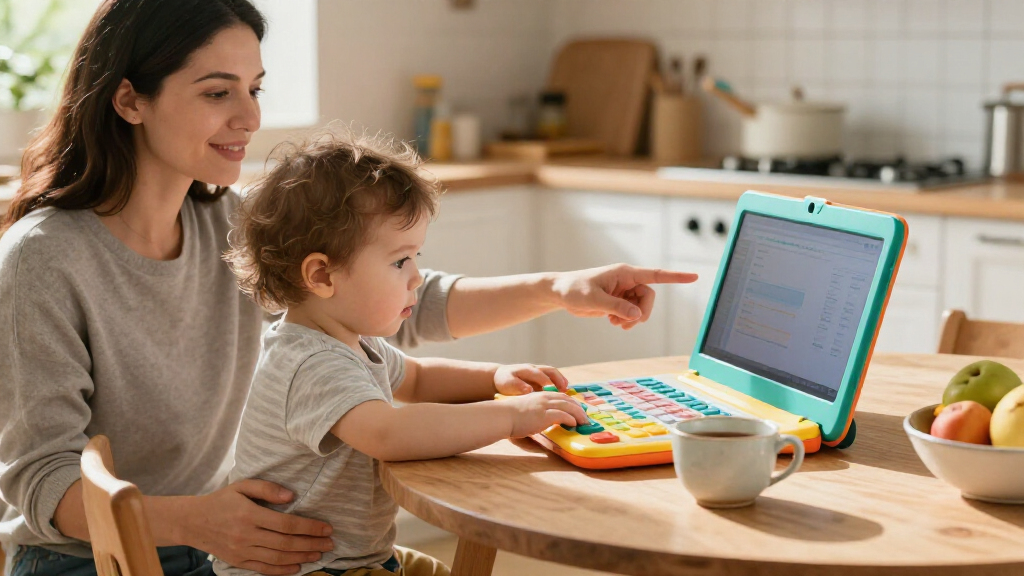

The best toddler learning laptops pair simple controls with activities a young child can explore without much help. My best overall pick is the VTech Play Smart Preschool Laptop for its preschool-focused format, while the VTech Tote and Go Laptop stands out for portability and the LeapFrog 2-in-1 LeapTop Touch for flexible play. The main tradeoff is between straightforward toddler-friendly play and broader activities that may suit an older preschooler better. Bilingual models add language exposure, while character-themed options may appeal more to children who already know the featured characters. Read on for the full breakdown, comparison criteria, and guidance on choosing a laptop that fits your child’s age and play style.

Turn the school run and nap time into listening time
- Thousands of audiobooks, podcasts and originals
- Listen on your phone, tablet or Echo — also offline
- Cancel anytime
Complete the kit


Key Takeaways
- The VTech Play Smart Preschool Laptop is my best overall pick because its preschool orientation gives it a clearer learning focus than models built mainly around portability or a theme.
- The Tote and Go Laptop prioritizes carrying convenience, while touch-oriented options such as the LeapTop Touch offer a different kind of hands-on interaction.
- Bilingual models serve a distinct purpose: the Winfun, Genio JuniorBook, and Lexibook options make language choice a central part of the decision.
- Character appeal and learning flexibility are not the same thing. Spider-Man, Unicorn, and Frozen 2 themes can help attract a child’s interest, but parents should still check the activity mix and language needs.
- There is no single best format for every toddler. A very young child may benefit more from simple, easy-to-operate play than from a laptop with a wider set of activities.
| 2-in-1 Learning Laptop Toy for Toddlers |  | Best for Early Toddler Exploration | Brand: GMAOPHY | Model: LAPTOP-G6 | Age range: 12 months and up | VIEW LATEST PRICE | See Our Full Breakdown |
| Winfun Bilingual Learning Laptop for Kids |  | Best for English-and-Spanish Basics | Brand: Winfun | Model: 240401 | Age range: 36 months–15 years | VIEW LATEST PRICE | See Our Full Breakdown |
| VTech Tote and Go Laptop, Orange |  | Best for Portable Skill-Building | Brand: VTech | Model: 80-155400 | Age range: 3–6 years | VIEW LATEST PRICE | See Our Full Breakdown |
| VTech Genio Bilingual JuniorBook Learning Laptop for Kids |  | Best for Older Preschoolers and Early School Skills | Brand: VTech | Age range: 5 years and up | Activities and apps: More than 80 | VIEW LATEST PRICE | See Our Full Breakdown |
| VTech Play Smart Preschool Laptop |  | Best Value for Preschool Variety | Brand: VTech | Model: 80-196340 | Age range: 3–6 years | VIEW LATEST PRICE | See Our Full Breakdown |
| Laradola 2-in-1 Learning Laptop Toy for Toddlers |  | Best for Flexible Screen-Free Play | Age range: 12 months to 4 years | Play modes: 4 | Learning themes: 100+ | VIEW LATEST PRICE | See Our Full Breakdown |
| Lexibook Spider-Man Bilingual Educational Laptop for Kids |  | Best for Bilingual Preschool Learning | Age range: 3 years and up | Languages: English and Spanish | Activities: 170 (85 per language) | VIEW LATEST PRICE | See Our Full Breakdown |
| LeapFrog ABC and 123 Laptop for Preschoolers, Green |  | Best for Early Coding and Computer Concepts | Age range: 3+ years; manufacturer range listed as 36 months to 6 years | Activities: 11 | Educational objectives: Basic computer skills, counting, and language | VIEW LATEST PRICE | See Our Full Breakdown |
| VTech Swipe and Learn Smarties Laptop, Blue |  | Best for Younger Toddlers | Age range: 18 months to 4 years | Learning activities: Letters, phonics, counting, numbers, animals, weather, and music | Music instruments: Piano, flute, guitar, violin, and xylophone | VIEW LATEST PRICE | See Our Full Breakdown |
| LeapFrog My Own Leaptop, Green |  | Best for Portable Pretend Play | Age range: 2+ years | Learning modes: ABCs, Messages, Games, and Music | Songs and melodies: 16 | VIEW LATEST PRICE | See Our Full Breakdown |
| LeapFrog 2-in-1 LeapTop Touch |  | Best for Laptop-to-Tablet Play | Brand: LeapFrog | Model: 80-600900 | Age range: 2–5 years | VIEW LATEST PRICE | See Our Full Breakdown |
| VTech Toddler Tech Laptop |  | Best for Youngest Beginners | Brand: VTech | Model number: 80-524700 | Recommended age: 12–36 months | VIEW LATEST PRICE | See Our Full Breakdown |
| LeapFrog My First STEAM Laptop | 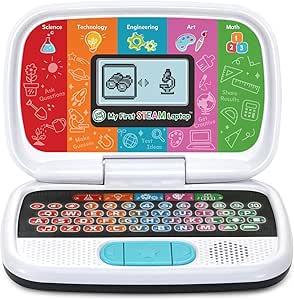 | Best for Early STEAM Exploration | Brand: LeapFrog | Model number: 80-621430 | Recommended age: 3 years and up | VIEW LATEST PRICE | See Our Full Breakdown |
| Lexibook Unicorn Bilingual Educational Laptop for Kids |  | Best for English-Spanish Activity Variety | Brand: Lexibook | Model: JC598UNIi2 | Age range: 4 years and up | VIEW LATEST PRICE | See Our Full Breakdown |
| Lexibook Disney Frozen 2 Bilingual Educational Laptop for Kids |  | Best for Frozen Fans Learning in Two Languages | Brand: Lexibook | Model: JC598FZi2 | Age range: 4 years and up | VIEW LATEST PRICE | See Our Full Breakdown |
| toddler learning laptop | Age range | Brand | Dimensions |
|---|---|---|---|
| 2-in-1 Learning Laptop Toy for | 12 months and up | GMAOPHY | — |
| Winfun Bilingual Learning Lapt | 36 months–15 years | Winfun | 12.6 × 2.7 × 12.5 inches |
| VTech Tote and Go Laptop | 3–6 years | VTech | 2.68 × 10.67 × 8.23 inches |
| VTech Genio Bilingual JuniorBo | 5 years and up | VTech | 11.3 × 7.5 × 1.4 inches |
| VTech Play Smart Preschool Lap | 3–6 years | VTech | — |
| Laradola 2-in-1 Learning Lapto | 12 months to 4 years | — | — |
| Lexibook Spider-Man Bilingual | 3 years and up | — | — |
| LeapFrog ABC and 123 Laptop fo | 3+ years; manufacturer range listed as 36 months to 6 years | — | 9.4 × 8.1 × 2.2 inches |
| VTech Swipe and Learn Smarties | 18 months to 4 years | — | 9.2 × 11 × 2 inches |
| LeapFrog My Own Leaptop | 2+ years | — | — |
| LeapFrog 2-in-1 LeapTop Touch | 2–5 years | LeapFrog | 2.05 × 10.08 × 6 inches |
| VTech Toddler Tech Laptop | — | VTech | 10 × 7 × 1.8 inches |
| LeapFrog My First STEAM Laptop | — | LeapFrog | 9.33 × 6.22 × 2.17 inches |
| Lexibook Unicorn Bilingual Edu | 4 years and up | Lexibook | — |
| Lexibook Disney Frozen 2 Bilin | 4 years and up | Lexibook | — |
More Details on Our Top Picks
2-in-1 Learning Laptop Toy for Toddlers
For a toddler who is still learning how to interact with a toy computer, the detachable base gives this model an advantage: it changes between keyboard and tablet-style play rather than asking a young child to use one layout. Its four modes cover letters, numbers, colors, spelling, quizzes, and music, while pretend-play prompts introduce everyday communication. The 120-plus learning themes offer more variety than the VTech Tote and Go Laptop, which focuses on 20 activities for ages 3–6. That breadth suits early exploration, though a large theme count does not necessarily mean each activity is deep. The main tradeoffs are its toddler-focused appeal, which older preschoolers may outgrow, and a battery compartment that requires a screwdriver to open. I’d choose it for younger children who benefit from flexible, simple play rather than a more advanced keyboard experience.
Pros:- Detachable base switches between keyboard and tablet-style play
- Four modes cover early academic topics and music
- More than 120 learning themes provide varied prompts
- Rounded edges and ABS plastic suit toddler-oriented play
Cons:- Toddler-focused activities may lose appeal as a child gets older
- A screwdriver is needed to open the power compartment
Best for: Families seeking a first learning laptop for a child 12 months or older, especially one who may enjoy switching between tablet and keyboard play.
Not ideal for: Parents shopping for an older preschooler who needs more advanced skills practice, or caregivers who want easy, tool-free access to the power compartment.
- Brand:GMAOPHY
- Model:LAPTOP-G6
- Age range:12 months and up
- Modes:Learning, spelling, quiz, and music
- Learning themes:More than 120
- Quiz questions:More than 70
- Material:ABS plastic
- Features:Detachable base, lights, sounds, music, and 8 function keys
Our verdict“Choose this for a young toddler who will benefit from two play formats and broad early-learning prompts, but not for a child ready for more advanced laptop activities.”
Winfun Bilingual Learning Laptop for Kids
The Winfun’s clearest reason to make this list is its English-and-Spanish activities, which pair early topics such as letters, numbers, shapes, animals, and foods with music. For households that want language exposure built into play, it offers a more direct bilingual starting point than the VTech Tote and Go Laptop, whose listed activities focus on general early-learning skills. The LCD screen, adjustable contrast, and volume control give caregivers a way to adapt the toy to the room and child, while the handle and built-in mouse make it easier to carry and use. Its age guidance begins at 3, so it is less suited to younger toddlers than the GMAOPHY 2-in-1. It is also a one-player toy, and conflicting product details in the description make its advertised content less clear than the other options here.
Pros:- Offers learning activities in English and Spanish
- Covers letters, numbers, shapes, animals, foods, and music
- Volume and screen contrast controls allow basic adjustment
- Built-in mouse and carry handle support portable play
Cons:- Designed for one player rather than shared play
- Product description contains conflicting details about puppies and grooming accessories
Best for: Families with children ages 3 and up who want a portable, single-child toy for introductory English and Spanish learning.
Not ideal for: Caregivers of children under 3, families seeking shared multiplayer play, or buyers who want a fully consistent description of included activities.
- Brand:Winfun
- Model:240401
- Age range:36 months–15 years
- Languages:English and Spanish
- Activity modes:5
- Screen:LCD
- Batteries:3 AAA batteries, included
- Dimensions:12.6 × 2.7 × 12.5 inches
- Weight:1.7 pounds
Our verdict“Pick the Winfun for portable bilingual basics for one child, but choose another model if toddler-age suitability or clearly specified content is your priority.”
VTech Tote and Go Laptop, Orange
Rather than chasing a huge activity count, the VTech Tote and Go Laptop builds a compact learning path from 20 activities with progressive difficulty levels. That makes it a better fit for a preschooler ready to revisit words, spelling, shapes, logic, and animals as skills grow than the GMAOPHY 2-in-1, which is aimed at children as young as 12 months. Name and avatar personalization can make the toy feel more engaging, and the attached mouse introduces a basic computer skill alongside the learning games. It also includes 30 melodies, giving children a music option between activities. The tradeoff is a non-backlit screen, which may be harder to see in dim rooms, plus the need for two AA batteries for regular use. I’d favor this model for portable, structured practice, not for a toddler seeking a simpler touch-oriented toy.
Pros:- 20 activities use progressive difficulty levels
- Covers words, spelling, shapes, logic, and animals
- Name and avatar personalization adds a personal element
- Attached mouse introduces basic mouse skills
Cons:- Non-backlit screen can be difficult to see in dim settings
- Requires two AA batteries for regular use
Best for: Families looking for a portable laptop toy for a 3–6-year-old who is ready for graduated spelling, logic, and mouse practice.
Not ideal for: Parents of children under 3 or anyone who needs a screen that is easy to see in low light.
- Brand:VTech
- Model:80-155400
- Age range:3–6 years
- Activities:20
- Words taught:More than 60
- Melodies:30
- Screen:Non-backlit; contrast adjustable
- Batteries:2 AA batteries; included for demonstration
- Dimensions:2.68 × 10.67 × 8.23 inches
Our verdict“Choose this for a preschooler who benefits from progressive activities and mouse practice, but not for younger toddlers or low-light play.”
VTech Genio Bilingual JuniorBook Learning Laptop for Kids
The JuniorBook is the most advanced classroom-style choice in this group, with more than 80 activities and apps across math, science, language arts, music, and Spanish. Its full-size QWERTY keyboard and cursor controller make it a stronger pick for practicing computer-style input than the VTech Play Smart Preschool Laptop, whose 26-letter and 10-number keys support simpler preschool play. Preloaded activities work without an internet connection, which keeps use straightforward and avoids needing online access. The age guidance, however, starts at 5, so this is not a fit for younger toddlers despite the roundup topic. It also requires four AA batteries for regular use; the included batteries are for demonstration. I’d select it for an older child moving toward broader school subjects and keyboard familiarity, rather than a beginner who needs simpler, toddler-level activities.
Pros:- More than 80 activities and apps span several school subjects
- Activities are available in English and Spanish
- Preloaded content works offline
- Full-size QWERTY keyboard and cursor controller support computer skills practice
Cons:- Age guidance starts at 5, making it unsuitable for younger toddlers
- Requires four AA batteries for regular use; included batteries are for demonstration
Best for: Families with children age 5 or older who want offline English-and-Spanish activities and practice with a full-size keyboard.
Not ideal for: Parents shopping for a child under 5 or seeking a simple first laptop toy with minimal keyboard demands.
- Brand:VTech
- Age range:5 years and up
- Activities and apps:More than 80
- Vocabulary words:More than 200
- Languages:English and Spanish
- Keyboard:Full-size QWERTY
- Internet connection:Not required; activities are preloaded
- Batteries:4 AA batteries required
- Dimensions:11.3 × 7.5 × 1.4 inches
Our verdict“Choose the JuniorBook for an older child ready for bilingual, offline school-style activities and keyboard practice, not for a toddler’s first learning laptop.”
VTech Play Smart Preschool Laptop
For a preschooler who wants more variety than a basic letter toy without moving up to a school-age laptop, the VTech Play Smart Preschool Laptop strikes a useful middle ground. Its 30 leveled activities span letters and words, numbers and shapes, animals and foods, logic, and music, with introductory Spanish included. Compared with the VTech Tote and Go Laptop, which offers 20 activities and progressive levels, this model supplies more activities and adds a broader set of listed learning categories. Its 26-letter keyboard and 10 number keys give children familiar buttons to explore, while name, age, and avatar personalization can help sustain interest. It is still designed for ages 3–6, so it won’t suit younger toddlers; regular play also calls for two AA batteries, and the supplied batteries are for demonstration. This is the more varied preschool pick, not the most toddler-focused one.
Pros:- 30 activities cover five broad learning categories
- Includes letters, numbers, shapes, logic, music, animals, and introductory Spanish
- 26-letter keyboard and 10 number keys support button-based practice
- Name, age, and avatar personalization can make play feel more individual
Cons:- Designed for ages 3–6 rather than younger toddlers
- Requires two AA batteries for regular use; included batteries are for demonstration
Best for: Families seeking a varied, age-appropriate learning toy for a 3–6-year-old who enjoys keyboard play and introductory Spanish.
Not ideal for: Caregivers of children under 3 or buyers wanting a laptop with fewer battery changes or more advanced school-age content.
- Brand:VTech
- Model:80-196340
- Age range:3–6 years
- Activities:30
- Keyboard:26 letters and 10 number keys
- Batteries:2 AA batteries
- Material:Plastic
- Included components:Play Smart Preschool Laptop and Parent’s Guide
Our verdict“Pick this for a preschooler who wants varied activities and simple keyboard practice, but look to a toddler-specific model for children under 3.”
Laradola 2-in-1 Learning Laptop Toy for Toddlers
The Laradola suits families who want a toddler laptop that can change shape without adding a screen. Its detachable laptop-and-tablet design lets children switch between keyboard-style play and a more portable tablet form, while four modes span letters, numbers, colors, spelling, music, and quizzes. That gives it broader activity variety than the LeapFrog My Own Leaptop, which focuses more on early letters, animal vocabulary, songs, and pretend messaging. The seven volume levels are useful when play moves between a quiet room and a noisier space, and automatic shut-off helps limit battery drain. The tradeoff is that the Laradola needs three AAA batteries, which are not included. It is also better suited to early exploration than to children seeking a conventional screen-and-mouse computer experience.
Pros:- Detachable design supports both laptop-style and tablet-style play
- Four modes cover letters, numbers, colors, spelling, music, and quizzes
- Seven volume levels allow more control over sound
- BPA-free ABS body, rounded edges, and screw-secured battery compartment
Cons:- Three AAA batteries are required and not included
- Screen-free interaction may not suit families seeking visible on-screen activities
Best for: Caregivers of toddlers who want varied, screen-free learning activities and a toy that can be used in both laptop and tablet configurations.
Not ideal for: Families wanting a display, bilingual lessons, or included batteries; the Laradola is screen-free and requires three AAA batteries.
- Age range:12 months to 4 years
- Play modes:4
- Learning themes:100+
- Quiz questions:70+
- Volume levels:7
- Design:Detachable 2-in-1 laptop and tablet
- Material:BPA-free ABS
- Power:3 AAA batteries, not included
Our verdict“Choose the Laradola for adaptable, screen-free toddler play; pick the Lexibook Spider-Man laptop instead if bilingual lessons and an animated LCD matter more.”
Lexibook Spider-Man Bilingual Educational Laptop for Kids
For preschoolers beginning to explore two languages, the Lexibook Spider-Man laptop stands out for its 85 activities in each of English and Spanish. The mix of language, math, logic, general knowledge, clock reading, and music gives it a more school-like range than the LeapFrog My Own Leaptop, which leans toward letters, animal names, songs, and pretend computer play. An animated LCD, keyboard, and mouse also give children more familiar computer cues than the screen-free Laradola. That breadth makes this a stronger fit for children around age three and up who enjoy structured activities, but it may be too involved for younger toddlers. The product information gives conflicting screen measurements, so I would not choose it based on display size. It also needs two AA batteries, and its themed design may appeal less to children who are not Spider-Man fans.
Pros:- Includes 170 activities split between English and Spanish
- Covers language, math, logic, general knowledge, clock reading, and music
- Animated LCD, keyboard, and mouse encourage computer-style interaction
- Includes entertainment games such as Snake and Maze
Cons:- Requires two AA batteries
- Screen size is listed inconsistently as 6.67 inches and 9.7 inches
- Age-three-and-up activity set is less suited to younger toddlers
Best for: Families with preschoolers aged three or older who want structured activities across English and Spanish, with a keyboard and mouse for computer-style play.
Not ideal for: Younger toddlers or buyers who need a clearly confirmed display size; the listed screen measurements conflict, and the activities are aimed at ages three and up.
- Age range:3 years and up
- Languages:English and Spanish
- Activities:170 (85 per language)
- Screen:LCD with animations
- Controls:Keyboard and mouse
- Power:2 AA/LR6 batteries
- Included components:Educational laptop, instruction manual, and mouse
Our verdict“Pick this Lexibook for bilingual preschool practice and varied subjects, but choose the VTech Swipe and Learn Smarties Laptop for a simpler activity set aimed at younger children.”
LeapFrog ABC and 123 Laptop for Preschoolers, Green
The LeapFrog ABC and 123 Laptop earns its place for children ready to move beyond simple button-pressing. Across 11 activities, it covers letters, counting, typing, and basic computer skills, with Pixel talking, singing, and dancing to keep practice lively. Its simple programming and message exchanges with Chip add an early logic angle that the LeapFrog My Own Leaptop does not emphasize as strongly; the My Own Leaptop is the more portable, song-and-vocabulary-focused option. The LeapFrog ABC and 123 is a better match for preschoolers who enjoy character-led tasks and pretend computer play, rather than very young toddlers just starting with sounds. The activity count is more focused than the Lexibook Spider-Man laptop’s 170 bilingual activities, and regular use calls for four AA batteries. The stated age guidance also varies between the title and manufacturer range.
Pros:- Combines letter, counting, typing, and basic computer activities
- Pixel talks, sings, and dances to support character-led play
- Adds simple programming and messaging activities
- Compact laptop-style format measures 9.4 × 8.1 × 2.2 inches
Cons:- Requires four AA batteries for regular use; supplied batteries are for demonstration
- Only 11 activities, fewer than the Lexibook Spider-Man laptop’s listed 170
- Age guidance differs between the product title and manufacturer range
Best for: Preschoolers aged roughly three to six who enjoy character-led practice and are ready for simple programming, typing, and computer concepts.
Not ideal for: Toddlers under three or families seeking bilingual instruction or a large activity library; this model has 11 activities and age guidance varies by listing.
- Age range:3+ years; manufacturer range listed as 36 months to 6 years
- Activities:11
- Educational objectives:Basic computer skills, counting, and language
- Power:4 AA batteries; included for demo, new batteries recommended
- Material:Plastic
- Dimensions:9.4 × 8.1 × 2.2 inches
- Weight:1.6 pounds
- Color:Green
Our verdict“Choose this LeapFrog for focused preschool computer and early coding play, while the Lexibook Spider-Man is a better fit for families prioritizing bilingual breadth.”
VTech Swipe and Learn Smarties Laptop, Blue
The VTech Swipe and Learn Smarties Laptop is the most age-targeted choice here for children from 18 months to four years. Its activities introduce letters, phonics, numbers, animals, weather, and music, so a toddler can meet several early-learning themes without the larger subject load of the Lexibook Spider-Man laptop, which is aimed at age three and up. The music mode adds a playful change of pace: children can play along with an animal band and choose among five instruments. Animated lights offer feedback during play, though this is still a toy rather than a computer with a conventional screen and mouse. Compared with the Laradola 2-in-1, it does not detach into a tablet, but its stated age range begins earlier. It needs three AA batteries, and the included cells are for demonstration.
Pros:- Introduces letters, phonics, counting, numbers, animals, and weather
- Music mode includes piano, flute, guitar, violin, and xylophone
- Animated lights provide feedback during activities
- Age range starts at 18 months, younger than the Lexibook Spider-Man model
Cons:- Requires three AA batteries; included batteries are for demo use
- Intended age range ends at four years
- Does not offer the Laradola’s detachable tablet configuration
Best for: Families looking for an activity laptop for toddlers aged 18 months to four years, especially children drawn to music, animal sounds, and early phonics.
Not ideal for: Buyers seeking a detachable tablet format, bilingual lessons, or a toy intended to grow well past age four.
- Age range:18 months to 4 years
- Learning activities:Letters, phonics, counting, numbers, animals, weather, and music
- Music instruments:Piano, flute, guitar, violin, and xylophone
- Power:3 AA batteries
- Material:Plastic
- Dimensions:9.2 × 11 × 2 inches
- Model number:80-576470
Our verdict“Choose the VTech for music-rich early play with a younger toddler; select the Laradola if a detachable design and adjustable volume are higher priorities.”
LeapFrog My Own Leaptop, Green
The LeapFrog My Own Leaptop keeps early learning simple and easy to carry. Its four modes cover ABCs, messages, games, and music, with 26 animal animations and 16 songs and melodies to support letter and vocabulary play. A handle makes it a practical pick for families who want a toy that can move between rooms or travel, while the option to spell a child’s name gives the pretend computer a personal touch. Compared with the LeapFrog ABC and 123 Laptop, this model puts less emphasis on programming and typing skills; it is better for lighter, character-based play than for preschoolers seeking those extra challenges. The VTech Swipe and Learn Smarties Laptop starts at 18 months, while this LeapFrog is listed for ages two and up. It requires three AA batteries, with new batteries recommended after the demo cells.
Pros:- Four modes cover ABCs, messages, games, and music
- Includes 16 songs and melodies plus 26 animal animations
- Handle supports carrying and on-the-go play
- Can be customized to spell the child’s name
Cons:- Requires three AA batteries; demo batteries are not intended for regular use
- Less emphasis on programming and computer skills than the LeapFrog ABC and 123 Laptop
- Age range starts at two years, later than the VTech Swipe and Learn Smarties Laptop
Best for: Families with children aged two and up who want a portable, personalized toy for early letters, animal vocabulary, songs, and pretend messaging.
Not ideal for: Preschoolers seeking coding-style activities, bilingual lessons, or a broad academic curriculum; its focus is lighter pretend play and early vocabulary.
- Age range:2+ years
- Learning modes:ABCs, Messages, Games, and Music
- Songs and melodies:16
- Animal animations:26
- Power:3 AA batteries
- Personalization:Can be customized to spell the child’s name
- Color:Green
Our verdict“Pick the My Own Leaptop for portable, personalized early play, but choose the LeapFrog ABC and 123 Laptop if typing and simple programming matter more.”
LeapFrog 2-in-1 LeapTop Touch
The 2-in-1 LeapTop Touch is a strong fit for toddlers who enjoy changing how they play: it converts from an A–Z keyboard laptop into a touch tablet. Its activities cover letters, numbers, games, music, and messages, while a customizable spelling activity gives a child’s own name a place in the learning mix. Compared with the LeapFrog My First STEAM Laptop, this model puts more emphasis on familiar early-learning play and hands-on format changes than guided STEAM topics. The carry handle also makes it easier to take along than a stationary play setup. The tradeoffs are its three-AA battery requirement and age range of 2–5, which may limit its usefulness as a child gets older. Choose it for flexible play, not long-term curriculum depth.
Pros:- Converts between laptop and touch-tablet modes for varied play
- Covers ABCs, numbers, games, music, and messages
- Customizable activity lets children practice spelling their name
- Take-along handle supports portability
Cons:- Requires three AA batteries for regular use
- Age range is limited to 2–5 years
Best for: Families with children ages 2–5 who want one portable toy that switches between keyboard and touch play.
Not ideal for: Caregivers seeking focused STEAM lessons or a toy intended to suit children beyond the preschool years.
- Brand:LeapFrog
- Model:80-600900
- Age range:2–5 years
- Learning modes:ABCs, numbers, games, music, messages
- Keyboard:Letters A–Z and numbers 1–10
- Battery requirement:3 AA batteries
- Dimensions:2.05 × 10.08 × 6 inches
- Weight:1.3 pounds
Our verdict“Pick this for a portable preschool laptop that adds tablet-style touch play and name practice.”
VTech Toddler Tech Laptop
For children just starting to explore buttons and sounds, the VTech Toddler Tech Laptop keeps the activities simple and physical. Five app buttons, a spinning disc, and a slider give little hands different ways to trigger songs, phrases, counting, and animal chats; the mirror screen adds light-up emoji responses without suggesting a conventional computer display. Its 12–36-month age range makes it a younger-child alternative to the LeapFrog 2-in-1 LeapTop Touch, which reaches older preschoolers and offers more keyboard and touch-tablet play. That simplicity is a strength for cause-and-effect discovery, but it also means less subject variety than the bilingual Lexibook laptops’ 124 activities. The toy needs fresh batteries for regular use, and its mirror-style screen is better suited to playful feedback than detailed visual lessons.
Pros:- Age-targeted activities introduce cause and effect and counting
- Buttons, spinning disc, and slider encourage hands-on exploration
- Songs, phrases, and animal chats add varied audio prompts
- Light-up emoji effects provide immediate visual feedback
Cons:- Fresh batteries are recommended for regular use
- Mirror screen and simple activities offer less scope for detailed learning
Best for: Families with children ages 12–36 months who are beginning to explore buttons, movement, sounds, and simple counting.
Not ideal for: Parents seeking a broad subject curriculum, bilingual practice, or a more traditional keyboard-and-screen experience.
- Brand:VTech
- Model number:80-524700
- Recommended age:12–36 months
- Educational objectives:Cause and effect, counting, fine motor skills
- Interactive features:Five app buttons, spinning disc, slider, mirror screen
- Battery requirement:3 AA batteries; demo batteries included
- Dimensions:10 × 7 × 1.8 inches
- Weight:15.84 ounces
Our verdict“Choose this for a very young toddler who needs simple, tactile cause-and-effect play rather than a broad lesson set.”
LeapFrog My First STEAM Laptop
The My First STEAM Laptop earns its place by giving preschool play a clearer subject focus: children explore plant growth, inventions, robot building, design, shapes, and counting through guided activities and animations. That makes it a more topic-driven choice than the LeapFrog 2-in-1 LeapTop Touch, whose appeal is its convertible format and broader mix of familiar early-learning modes. The STEAM approach may suit a curious child who likes following prompts and trying creative tasks, but it is designed for one player, so it is not built around shared play. Its 3+ age recommendation also makes it less suitable for younger toddlers than the VTech Toddler Tech Laptop. Expect battery-powered, single-child activities rather than open-ended lessons or a toy that grows across a wide age span.
Pros:- Covers a varied set of early STEAM topics
- Guided activities help turn concepts into manageable play
- Animations support creative and topic-based activities
- Combines shape recognition, counting, and logical thinking
Cons:- Designed for one player
- Requires two AA batteries, with new batteries recommended for regular use
Best for: Families with children 3 and older who enjoy guided activities about science, building, shapes, design, and counting.
Not ideal for: Households looking for a toy for children under 3, shared multiplayer play, or bilingual lessons.
- Brand:LeapFrog
- Model number:80-621430
- Recommended age:3 years and up
- Educational objectives:Early development, logical thinking, motor skills, STEAM, shape recognition
- Activities:Plant growth, inventions, robot building, creative designs, shape matching, counting
- Battery requirement:2 AA batteries; demo batteries included
- Number of players:1
- Dimensions:9.33 × 6.22 × 2.17 inches
Our verdict“Pick this for a preschooler who is ready for guided STEAM activities rather than a convertible laptop-and-tablet toy.”
Lexibook Unicorn Bilingual Educational Laptop for Kids
The Lexibook Unicorn Bilingual Educational Laptop suits families who want one toy to cover several school-readiness subjects in English and Spanish. Its 124 activities range across language, math, typing, logic, general knowledge, and telling time, with games and music to vary the pace. Compared with the Lexibook Disney Frozen 2 Bilingual Educational Laptop, the learning format is very similar; the main distinction here is the unicorn design rather than a different activity set. Its keyboard and mouse offer a more laptop-like setup than the VTech Toddler Tech Laptop, but the 4+ age recommendation makes it a better match for older preschoolers than young toddlers. The large activity count broadens the menu, though the product details do not describe the depth or progression of each lesson. It also needs two AA batteries and carries a three-month warranty.
Pros:- Offers 124 activities across language, math, typing, logic, general knowledge, and time
- Supports both English and Spanish
- Includes games and introductory music activities
- Keyboard and mouse encourage laptop-style interaction
Cons:- Requires two AA batteries
- Three-month warranty is limited
- Activity count is provided without details on lesson progression
Best for: Families with children 4 and up who want bilingual English-Spanish practice across several early-learning subjects.
Not ideal for: Caregivers shopping for toddlers under 4 or seeking clearly described lesson progression and a longer warranty.
- Brand:Lexibook
- Model:JC598UNIi2
- Age range:4 years and up
- Languages:English and Spanish
- Activities:124
- Subjects:Language, mathematics, typing, logic, general knowledge, telling time
- Battery requirement:2 AA batteries
- Included components:Educational laptop, mouse, instruction manual
- Warranty:3 months
Our verdict“Choose this for an older preschooler who will use a broad bilingual activity menu and enjoys the unicorn design.”
Lexibook Disney Frozen 2 Bilingual Educational Laptop for Kids
The Disney Frozen 2 Bilingual Educational Laptop pairs a familiar character theme with a substantial set of bilingual activities, making it a plausible way to draw a Frozen fan toward typing, language, math, logic, and clock-reading. It shares the 124-activity English-and-Spanish format and keyboard-and-mouse setup of the Lexibook Unicorn Bilingual Educational Laptop; the choice between them is mainly a matter of which design is more likely to appeal to the child, not a clear difference in learning scope. Compared with the LeapFrog My First STEAM Laptop, this model covers a wider mix of stated subjects and adds two languages, while the LeapFrog offers more explicit guided STEAM topics. The 4+ age floor means it is not a toddler pick for younger children, and the two-AA requirement and three-month warranty are practical limitations.
Pros:- Provides 124 activities across multiple learning subjects
- Supports both Spanish and English
- Includes music, games, and LCD animations
- Mouse and keyboard create a laptop-like play setup
Cons:- Requires two AA batteries
- Designed for children aged 4 and up, excluding younger toddlers
- Warranty is limited to three months
Best for: Families with a Frozen fan aged 4 or older who want English-and-Spanish activities across several school-readiness subjects.
Not ideal for: Parents buying for children under 4 or prioritizing guided STEAM lessons over themed bilingual activities.
- Brand:Lexibook
- Model:JC598FZi2
- Age range:4 years and up
- Languages:Spanish and English
- Activities:124
- Subjects:Language, typing, mathematics, logic, music, clock-reading
- Battery requirement:2 AA batteries
- Included components:Educational laptop, mouse, instruction manual
- Warranty:3 months
Our verdict“Pick this for a Frozen-loving child aged 4 or older who is more drawn to themed bilingual practice than STEAM-focused lessons.”
How We Picked
I compared the 15 listed models through the needs of toddler and preschool-age buyers: age-appropriate interaction, clarity of learning activities, ease of operation, and practical design. I also looked at how each product’s format could suit a particular household, including portability, touch-style play, bilingual use, and character themes. Because product names alone do not establish exact age guidance, activity depth, durability, or included features, buyers should confirm those details on the product listing and packaging before purchasing.
The order favors models with a clear role in early learning and a usable balance of play and educational focus. Options with a specialized strength, such as bilingual activities or a portable design, remain useful picks but rank below the best overall choice when that strength may not matter to every family. The roundup also distinguishes themed laptops from more broadly positioned learning models: character familiarity can encourage interest, but it should not outweigh age fit, language needs, or how easily a child can use the controls.
Factors to Consider When Choosing Best Toddler Learning Laptops
Choosing among toddler laptops is less about collecting the most activities and more about matching the device to the child who will use it. I would start with how independently your child can play, then weigh language, format, and the role you want the toy to play at home.
Match the controls to your child’s current skills
A laptop that looks educational can still frustrate a toddler if its buttons, menus, or activity changes demand too much adult help. Think about whether your child is comfortable pressing individual keys, following spoken prompts, or using touch controls. A simpler layout can support independent exploration, while a more varied interface may have greater appeal as skills grow. Avoid choosing by the number of activities alone; a child who cannot easily start or understand them may use only a small portion of the toy. Check the recommended age range and look for clear descriptions of how play begins and changes. If you are buying for a younger toddler, ease of use is often a better first priority than breadth.
Decide whether bilingual play fits your household
Bilingual laptops can add exposure to another language through familiar play routines, but the value depends on how your family expects to use them. Consider whether the child will hear both languages regularly or whether the second language is meant to introduce new words. Check whether a model switches between languages, presents them together, or uses different modes; those formats can lead to very different play experiences. Do not assume that a bilingual label means equal depth in both languages. A parent may need to join in at first, especially if the child is unfamiliar with the second language. If bilingual learning is not a goal, a simpler single-language choice may be easier to use consistently.
Choose a learning focus before comparing activity counts
Early-learning toys may emphasize letters, numbers, words, music, or a broader mix, and toddlers do not need every focus at once. Ask what skill your child is already curious about and what would complement books, puzzles, or play at home. A narrow focus can make the toy easier to understand, while a broader activity set may hold interest longer if the controls remain accessible. Product names can suggest a theme, but they do not tell you how much practice each activity provides. Read the feature details to learn whether the laptop offers guided prompts, free exploration, or both. This helps prevent paying for variety that your child may not use.
Treat portability and play format as practical choices
Before choosing a compact or travel-oriented model, think about where the laptop will be used and how it will be stored. A carry-friendly design may suit car trips or visits, but it is not automatically a better everyday toy if your child mostly plays at home. Touch-style play can feel more familiar to children who enjoy tapping screens, while buttons may offer a more tactile alternative. Neither format is inherently better for learning; the useful one is the format your child can operate and return to. Check the product dimensions, power requirements, and any small accessories listed by the manufacturer. These details can affect how well the toy fits a bag, play area, or household routine.
Separate character appeal from long-term usefulness
A familiar character or theme may help a child take interest in a new toy, but it does not tell you whether the learning activities will remain engaging. Think about whether your child already enjoys the character and whether the theme is likely to hold attention beyond a short phase. Compare the activity description and language options against less character-led alternatives before deciding. A themed model can be a sensible choice when the child’s interest is the main barrier to trying educational play. It may be a weaker fit when your priority is a specific learning focus or bilingual use. Treat the theme as a reason to choose between otherwise suitable options, not as a substitute for checking the core features.
Check ownership details before buying
Battery type, volume controls, cleaning guidance, and durability can shape daily satisfaction more than a long activity list. Confirm whether batteries are included and whether the product has an adjustable volume setting, since these details vary by model and listing. For a toy used by a toddler, check the manufacturer’s age guidance and care instructions rather than assuming all learning laptops handle rough play the same way. Consider who will keep the toy clean and where it will be stored between uses. If the listing does not clearly explain a feature that matters to your household, verify it before purchase. A little checking can prevent a mismatch between the toy’s advertised role and your family’s practical needs.
Frequently Asked Questions
Is a learning laptop suitable for a child under two?
Suitability depends on the specific model’s age guidance and the child’s ability to interact with its controls. Some toddlers may enjoy simple buttons and sounds, while others may need an adult to help start activities or stay focused. Check the manufacturer’s recommended age range and safety information rather than relying on the word “toddler” in a product title. A learning laptop should be one kind of play, not a replacement for shared reading, conversation, and hands-on toys. If your child is very young, prioritize simple operation and close adult supervision.
Should I choose a bilingual laptop if my child is learning one language at home?
A bilingual model can offer exposure to a second language, but it is most useful when the format fits your household’s language goals. Check how the toy presents each language and whether an adult can help connect spoken prompts with everyday words. If your child is still building familiarity with the home language, a bilingual toy may work best as occasional shared play rather than the main learning tool. Parents who want one clear language for independent play may prefer a simpler option. The decision should follow your family’s routine, not the bilingual label alone.
Are character-themed learning laptops a good choice for a first laptop toy?
They can be a good starting point if the child already enjoys the character and that interest encourages them to try the activities. Before choosing one, compare its learning focus, language options, and controls with a non-themed model. A familiar theme does not necessarily mean a broader or more useful activity set. If your child’s interest in the character is strong, the theme may help the toy feel inviting; if not, it may add little. Choose based on both engagement and the kind of play you want the laptop to support.
Is a touch-style laptop better than one with buttons?
Neither format is automatically better for toddlers. Buttons offer a physical response that may help a child understand which action they have taken, while touch-style controls can feel familiar to children who watch adults use screens. What matters is whether the child can operate the toy without repeated frustration and whether the controls suit the intended age range. If possible, check product images or demonstrations to see the size and layout of the controls. Do not assume a touch interface works like a tablet; it may support only specific toy activities.
What should I check before buying a toddler learning laptop online?
Confirm the age recommendation, activity descriptions, language modes, power source, and whether batteries are included. Look for details on volume adjustment, cleaning, dimensions, and any small parts, particularly if the toy will be used by a younger toddler. Product titles can be broad, so read the full feature list to distinguish a laptop’s theme from its actual learning activities. If a key feature is unclear, verify it with the manufacturer or seller before ordering. These checks matter more than assuming similarly named models share the same functions.
Conclusion
For the broadest fit among these options, I recommend the VTech Play Smart Preschool Laptop as best overall, with the VTech Tote and Go Laptop as my pick for families who value portability. For a flexible hands-on format, consider the LeapFrog 2-in-1 LeapTop Touch; for bilingual play, compare the Winfun Bilingual Learning Laptop and VTech Genio Bilingual JuniorBook against your language needs. The best choice for beginners is the model whose controls and activity format match your child’s current abilities, rather than the one with the longest feature list. I would treat the character-themed Lexibook models as specific-interest picks, not automatic learning upgrades. Pick the laptop that fits your child’s age, language goals, and everyday play routine, and verify the exact features before buying.