

If you’re looking for the best Eero Wi-Fi mesh systems in 2025, I recommend checking out models like the eero 6, 6+, Pro 6E, and the new Wi-Fi 7 versions like the eero 7 and Max 7. These systems offer great coverage, fast speeds, and smart home integration for any home size. Whether you’re on a budget or need top-tier performance, there’s an option for you. Keep going to discover all the top picks and what makes each one special.
Key Takeaways
- The top Eero mesh systems support Wi-Fi 6, Wi-Fi 6E, and Wi-Fi 7, offering speeds from 1 Gbps to 10 Gbps for future-proofing.
- Coverage ranges from 1,500 sq. ft. for single units to 7,500 sq. ft. with multi-pack setups, suitable for large homes.
- Advanced mesh and routing technologies like TrueMesh ensure seamless coverage with minimal dead spots.
- Built-in smart home hubs and protocol support (Zigbee, Thread, Matter) simplify device integration and automation.
- User-friendly app setup, security features like WPA3, and compatibility with Alexa and other protocols enable easy management.
Amazon eero 6+ Mesh WiFi System (3-Pack)


If you’re looking for an affordable yet powerful mesh Wi-Fi system for a large home, the Amazon eero 6+ Mesh WiFi System (3-Pack) is an excellent choice. It supports gigabit speeds up to 1 Gbps, providing fast, reliable internet across up to 4,500 sq. ft. and connecting over 75 devices simultaneously. Its Wi-Fi 6 technology offers increased bandwidth, while TrueMesh routing ensures steady coverage with fewer dead spots. Setup is quick via the eero app, and managing the network remotely is simple. Plus, its built-in smart home hub connects Thread and Zigbee devices effortlessly, making it a versatile, dependable solution for modern smart homes.
Best For: households seeking an affordable, high-performance mesh Wi-Fi system capable of supporting large homes and numerous smart devices.
Pros:
- Supports gigabit speeds up to 1 Gbps for fast, reliable internet.
- Covers up to 4,500 sq. ft. and connects over 75 devices simultaneously.
- Easy to set up and manage remotely via the eero app, with automatic updates for security.
Cons:
- Subscription required for some advanced security and network management features.
- May be overkill for small apartments or homes with minimal device needs.
- Limited to internet plans up to 1 Gbps, which could be restrictive for higher-tier plans.
Amazon eero 6 Mesh WiFi System (3-Pack)

The Amazon eero 6 Mesh WiFi System (3-Pack) is an excellent choice for homeowners seeking reliable, whole-home coverage with easy setup. Supporting internet plans up to 500 Mbps, it covers up to 4,500 square feet with one router and two extenders. Using Wi-Fi 6 technology, it delivers fast speeds and can handle over 75 devices simultaneously, perfect for busy households. Setup is quick via the eero app, and users often see immediate performance improvements. Plus, it doubles as a Zigbee smart home hub, integrating seamlessly with Alexa and smart devices. Despite some minor bugs, its reliability and smart features make it a top contender in 2025.
Best For: households seeking seamless, reliable whole-home WiFi coverage with smart home integration and easy setup.
Pros:
- Supports Wi-Fi 6 (802.11ax) technology, delivering fast speeds and handling over 75 devices simultaneously
- Easy to set up via the eero app with guided instructions, providing quick network improvements
- Doubles as a Zigbee smart home hub, compatible with Alexa for integrated smart device control
Cons:
- Lacks advanced local management features and some detailed network controls compared to traditional routers
- Some app functions may be buggy or temporarily non-operational, requiring support or workarounds
- May encounter compatibility or setup issues with certain internet service providers, such as DHCP failures
Amazon eero 6+ Mesh WiFi System (2-Pack)

The Amazon eero 6+ Mesh WiFi System (2-Pack) stands out as an excellent choice for large households or those with extensive smart home setups, thanks to its impressive coverage of up to 3,000 square feet and support for over 75 devices. It delivers fast speeds up to AX3000 with Wi-Fi 6, ensuring reliable streaming, gaming, and device connectivity. Setup is quick via the eero app, and the system intelligently routes traffic to eliminate dead zones. It also includes a built-in Zigbee, Thread, and Alexa-compatible smart home hub, making smart device integration straightforward. Many users report stable, gigabit-speed connections across multiple floors without lag.
Best For: households with large or multi-story homes and extensive smart home device setups seeking reliable, fast Wi-Fi coverage with easy management.
Pros:
- Supports internet plans up to 1 Gbps and covers up to 3,000 sq ft with a 2-pack, ideal for large spaces.
- Features Wi-Fi 6 with speeds up to AX3000, ensuring fast and reliable connections for multiple devices.
- Built-in smart home hub compatible with Zigbee, Thread, and Alexa simplifies smart device integration.
Cons:
- May require proper placement and wired connections for optimal performance, which can be slightly complex for some users.
- Subscription services like eero Plus are optional and may incur additional costs for enhanced security features.
- Limited to 2 units in the standard pack, which might require additional units for very large or complex setups.
Amazon eero Pro 6E Mesh WiFi System (3-Pack)

For homeowners seeking lightning-fast, reliable Wi-Fi coverage across large spaces, the Amazon eero Pro 6E Mesh WiFi System (3-Pack) stands out as an excellent choice. It supports internet plans up to 2.5 Gbps and covers up to 6,000 sq. ft., connecting over 100 devices seamlessly. With Wi-Fi 6E, it offers speeds up to 1.6 Gbps and low latency, ideal for gaming and streaming. Setup is simple through the eero app, and the system intelligently routes traffic with Eero TrueMesh technology. While it includes Zigbee hub functionality, some smart devices like motorized shades may need extra hardware for ideal compatibility.
Best For: homeowners with large homes or multiple smart devices seeking fast, reliable Wi-Fi coverage and easy setup.
Pros:
- Supports internet plans up to 2.5 Gbps with extensive coverage up to 6,000 sq. ft.
- Seamless integration of Wi-Fi 6E and Zigbee smart home hub for versatile connectivity.
- User-friendly setup via the eero app with automatic updates and remote management.
Cons:
- Compatibility issues may arise with certain Zigbee devices like motorized shades, requiring additional hardware.
- Some users experience devices reconnecting as unknown or new devices appearing periodically.
- Turning off mesh roaming to stabilize Zigbee devices can reduce overall mesh network benefits.
Amazon eero 6 Mesh WiFi System (2-Pack)

If you’re looking to eliminate dead zones and guarantee reliable Wi-Fi coverage throughout a medium-sized home, the Amazon eero 6 Mesh WiFi System (2-Pack) is an excellent choice. It covers up to 3,000 sq ft with one router and one extender, supporting speeds up to 500 Mbps. The mesh technology ensures seamless streaming, gaming, and video calls by optimizing coverage. Supporting over 75 devices with Wi-Fi 6, it offers fast, reliable connections for all your smart home gadgets. Setup is quick via the eero app, and it functions as a Zigbee hub for smart home integration. Plus, it’s expandable and easy to manage remotely, making it a versatile option for modern households.
Best For: households seeking seamless, high-speed Wi-Fi coverage for multiple devices and smart home integration in medium-sized homes.
Pros:
- Easy setup with the eero app and remote management features
- Supports Wi-Fi 6 for faster speeds and increased device capacity
- Functions as a Zigbee smart home hub, enhancing smart device connectivity
Cons:
- Supports speeds up to 500 Mbps, which may be limiting for ultra-high-speed needs
- Requires a compatible smart home ecosystem (Amazon Alexa) for full smart hub features
- Limited to 3,000 sq ft coverage with the 2-pack, may require additional units for larger homes
Amazon eero 7 Dual-Band Mesh Wi-Fi 7 Router (2-Pack)

The Amazon eero 7 Dual-Band Mesh Wi-Fi 7 Router (2-Pack) stands out as an ideal choice for large homes or multi-level spaces that demand fast, reliable coverage. Supporting internet plans up to 2.5 Gbps and covering up to 4,000 sq. ft., it’s future-proof with Wi-Fi 7 features like multi-link operation. Compatible with all previous eero models, it also integrates with Alexa, Matter, Zigbee, and Thread. Powered by a Qualcomm quad-core processor, it offers strong performance, support for over 120 devices, and easy setup via an app. Its sleek design, security features, and optional wired backhaul make it a versatile, reliable upgrade for seamless home connectivity.
Best For: households requiring extensive, high-speed Wi-Fi coverage across large or multi-level spaces with multiple smart devices.
Pros:
- Supports internet plans up to 2.5 Gbps and covers up to 4,000 sq. ft., ideal for large homes.
- Future-proof with Wi-Fi 7 features like multi-link operation and compatibility with smart home standards.
- Easy setup via mobile app, with sleek design and reliable performance for streaming, gaming, and connected devices.
Cons:
- Occasional connectivity issues with older smart devices and legacy 2.4 GHz-only gadgets.
- Limited improvement over previous models for some users, with troubleshooting sometimes necessary.
- Smart home device compatibility may require reconfiguration or device replacement.
Amazon eero 6 Mesh Wi-Fi Extender

The Amazon eero 6 Mesh Wi-Fi Extender is an excellent choice for anyone looking to strengthen and expand their existing eero network, especially in larger homes. It adds up to 1,500 sq. ft. of Wi-Fi 6 coverage, reducing dead spots and buffering. Setting it up is quick and easy through the eero app, and you can manage your network remotely. It intelligently routes traffic with TrueMesh technology, supporting 4K streaming, gaming, and video calls smoothly. Plus, automatic updates keep your network secure and performing *ideal*. Multiple extenders can be added to maximize coverage, making it a flexible solution for seamless home connectivity.
Best For: homeowners with an existing eero network seeking to expand Wi-Fi coverage and improve connectivity throughout larger living spaces.
Pros:
- Easy setup via the eero app, allowing quick installation in minutes.
- Supports Wi-Fi 6, providing faster speeds and better device handling.
- Uses TrueMesh technology to reduce dead spots, buffering, and support high-bandwidth activities like streaming and gaming.
Cons:
- Requires an existing eero network for operation, limiting standalone use.
- May need multiple extenders for very large homes, increasing overall cost.
- Automatic updates, while beneficial for security, might occasionally impact device performance during updates.
Amazon eero Pro 7 Tri-Band Mesh Wi-Fi 7 Router (3-Pack)

For those seeking a high-performance Wi-Fi system that can handle demanding smart homes and small to medium-sized businesses, the Amazon eero Pro 7 Tri-Band Mesh Wi-Fi 7 Router (3-Pack) stands out. Supporting internet plans up to 5 Gbps and covering up to 6,000 sq. ft., it features Wi-Fi 7 with three radios across 2.4 GHz, 5 GHz, and 6 GHz bands. With six spatial streams, MU-MIMO, and channel widths up to 320 MHz, it delivers fast, reliable connectivity for over 600 devices. Easy to set up via the eero app, it provides advanced security, seamless mesh expansion, and smart home integration, making it ideal for modern, connected environments.
Best For: users seeking a high-speed, reliable Wi-Fi system capable of supporting numerous smart devices in home or small to medium-sized business environments.
Pros:
- Supports internet plans up to 5 Gbps with extensive coverage up to 6,000 sq. ft. in a 3-pack setup.
- Advanced Wi-Fi 7 features with tri-band radios, MU-MIMO, and channel widths up to 320 MHz for fast, stable connections.
- Easy setup and management through the eero app, with seamless mesh expansion and robust security features.
Cons:
- Higher cost compared to traditional routers and mesh systems, which may be a deterrent for budget-conscious users.
- Requires proper placement and high-quality cables for optimal wired performance; setup can be more complex for non-experts.
- Limited to compatibility with specific smart home protocols and ecosystems, potentially restricting some device integrations.
Amazon eero Pro 6E Mesh WiFi System (2-Pack)
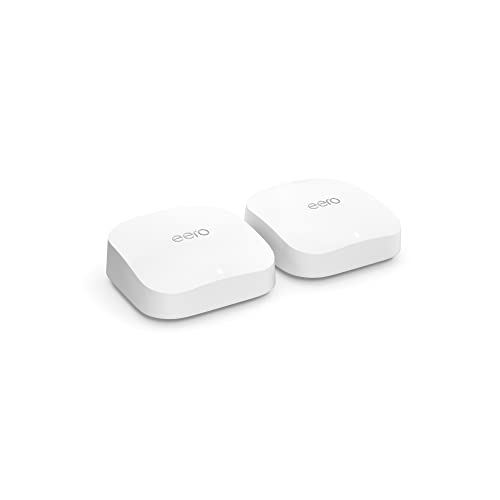
If you’re seeking a mesh Wi-Fi system that delivers blazing-fast speeds and extensive coverage for a busy smart home, the Amazon eero Pro 6E Mesh WiFi System (2-Pack) stands out. Supporting internet plans up to 2.5 Gbps and covering up to 4,000 sq. ft., it connects over 100 devices with Wi-Fi 6E technology, ensuring low latency and fast speeds. Setup is quick via the eero app, and its TrueMesh technology optimizes traffic routing. It’s compatible with Alexa, Zigbee, Thread, and smart home devices, making it perfect for large homes with multiple gadgets. Users praise its stability, speed, and seamless device management.
Best For: households with multiple devices, smart home enthusiasts, and users seeking fast, reliable Wi-Fi coverage across large or multi-floor homes.
Pros:
- Supports internet plans up to 2.5 Gbps with extensive coverage of up to 4,000 sq. ft. in a 2-pack
- Advanced Wi-Fi 6E technology offering faster speeds, lower latency, and access to the new 6 GHz band
- Easy setup via the eero app with seamless device and smart home integration, plus reliable mesh backhaul with TrueMesh technology
Cons:
- Device management can be challenging, with some devices reconnecting as “unknown” or bouncing between nodes
- Zigbee device compatibility may require additional hardware or configurations for full functionality
- Subscription-based features like eero Plus come at an extra cost for advanced security and analytics
Amazon eero 6+ Mesh WiFi Router
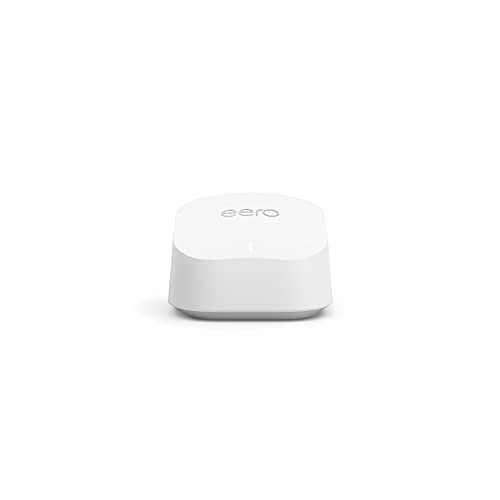
Looking for an affordable yet powerful Wi-Fi mesh system that keeps up with a busy household? The Amazon eero 6+ Mesh WiFi Router is a great choice. It supports Wi-Fi 6, delivering speeds up to 1 gigabit, perfect for streaming, gaming, and working simultaneously. Covering up to 1,500 square feet and connecting over 75 devices, it’s easily expandable with additional eero units. Its TrueMesh technology reduces dead spots, while the built-in Zigbee hub simplifies smart home setup. Setup is straightforward via the eero app, and you can manage your network remotely. All this at a price point that makes high-performance Wi-Fi accessible for most families.
Best For: households seeking an affordable, high-performance mesh Wi-Fi system that easily supports multiple devices and smart home integration.
Pros:
- Supports Wi-Fi 6 with speeds up to 1 Gbps for fast, reliable connectivity.
- Covers up to 1,500 sq. ft. and connects over 75 devices, suitable for busy homes.
- Easy setup and management via the eero app, with automatic updates for security and performance.
Cons:
- May require additional eero units for larger or multi-story homes.
- Subscription may be needed for advanced security and network management features.
- Built-in smart home hub supports Thread and Zigbee but may have compatibility limitations with some smart devices.
Amazon eero Max 7 Mesh WiFi System (3-Pack)

The Amazon eero Max 7 Mesh WiFi System (3-Pack) stands out as an ideal choice for large households and smart homes that demand lightning-fast, reliable internet across extensive spaces. Supporting internet plans up to 10 Gbps and Wi-Fi 7 technology, it delivers wireless speeds up to 4.3 Gbps and wired speeds reaching 9.4 Gbps via two 10-Gigabit Ethernet ports. Covering up to 7,500 sq. ft., it connects over 750 devices seamlessly, eliminating dead zones. Its mesh network, user-friendly setup, and smart home compatibility with protocols like Thread and Zigbee make it a future-proof, high-performance system perfect for demanding households.
Best For: large households and smart homes needing ultra-fast, reliable WiFi coverage across extensive areas with multiple devices.
Pros:
- Supports internet plans up to 10 Gbps with Wi-Fi 7 technology for exceptional speed.
- Seamless coverage up to 7,500 sq. ft. with mesh networking and easy expansion.
- Compatible with various smart home protocols (Thread, Zigbee, Matter) and integrates with Alexa for smart device management.
Cons:
- Higher price point reflecting premium features and performance.
- Requires compatible devices to fully utilize Wi-Fi 7 speeds.
- Advanced setup and management may be complex for users unfamiliar with mesh systems.
TP-Link Deco X55 AX3000 WiFi 6 Mesh System (3-Pack)

For those seeking reliable, high-speed Wi-Fi coverage across a large home, the TP-Link Deco X55 AX3000 Mesh System (3-Pack) stands out as a top choice. It delivers seamless coverage up to 6,500 square feet with Wi-Fi 6 technology, eliminating dead zones and buffering. Supporting up to 150 devices, it ensures smooth streaming, gaming, and browsing. Each unit has three Gigabit Ethernet ports, and wired backhaul enhances speed and stability. The system uses AI to optimize your network and is easy to set up via the Deco app. Plus, it offers advanced security, making it a dependable, high-performance home Wi-Fi solution.
Best For: households or large spaces seeking reliable, high-speed Wi-Fi coverage with multiple devices and seamless connectivity.
Pros:
- Covers up to 6,500 sq ft with seamless Wi-Fi 6 mesh technology.
- Supports up to 150 devices simultaneously for smooth streaming and gaming.
- Easy setup via the Deco app with advanced security features.
Cons:
- Higher initial cost compared to traditional routers or extenders.
- Requires compatible devices to fully utilize Wi-Fi 6 benefits.
- May be overkill for small homes or minimal device use.
Like-New Amazon eero mesh WiFi router
If you already have a compatible modem and want a reliable, cost-effective upgrade, the Like-New Amazon eero mesh WiFi router is an excellent choice. It’s refurbished, tested, and comes with the same warranty as new models. This fast standalone router covers up to 1,500 sq. ft. and integrates easily with Alexa for simple management. Setup takes less than 10 minutes through the eero app, and it supports multiple WiFi networks for device separation. While it needs an existing modem/router to operate—so it’s not ideal for new network setups—it offers strong, consistent coverage and reliable performance, making it a smart upgrade for existing home networks.
Best For: homeowners with an existing modem seeking a reliable, cost-effective mesh WiFi upgrade to improve coverage and device management.
Pros:
- Easy setup in less than 10 minutes via the eero app with remote management capabilities
- Strong, consistent coverage up to 1,500 sq. ft. suitable for multi-level homes
- Compatible with Alexa and supports multiple WiFi networks for device separation
Cons:
- Requires an existing modem/router; cannot operate as a standalone device for new network setups
- Some users experience setup difficulties despite clear instructions
- House layout and structure can influence the number of nodes needed for optimal coverage
Amazon eero 7 Mesh Wi-Fi 7 Router (3-Pack)

Super-fast internet plans up to 2.5 Gbps become truly beneficial with the Amazon eero 7 Mesh Wi-Fi 7 Router (3-Pack), as it’s designed to handle large homes and multiple devices seamlessly. This system offers extensive coverage—up to 6,000 sq. ft.—and supports over 120 devices, making it perfect for busy households. Its Wi-Fi 7 support guarantees future-proof performance, with fast speeds and reliable connections. Setup is straightforward via the app, and the system includes security features like WPA3 and IPv6. While some legacy devices may need reconfiguration, overall, it delivers impressive speed, coverage, and ease of use—ideal for streaming, gaming, and smart home integration.
Best For: households with large spaces and multiple devices seeking fast, reliable Wi-Fi 7 coverage and smart home integration.
Pros:
- Supports internet plans up to 2.5 Gbps for high-speed connectivity
- Covers up to 6,000 sq. ft. and supports over 120 devices
- Easy to set up via app with automatic configuration and security updates
Cons:
- Some legacy smart devices may require reconfiguration or replacement
- Limited support for certain smart home protocols without additional subscriptions
- Slightly higher cost compared to previous-generation routers
Amazon eero Pro 7 Mesh Wi-Fi 7 Router (2-Pack)

The Amazon eero Pro 7 Mesh Wi-Fi 7 Router (2-Pack) stands out as an ideal choice for those needing robust, high-speed connectivity across larger homes or small businesses. Supporting internet plans up to 5 Gbps, it covers up to 4,000 sq. ft. with two units, ensuring strong coverage everywhere. Built on Wi-Fi 7 technology, it offers speeds up to 3.9 Gbps and multi-link operation for reliable, fast connections. Capable of supporting over 400 devices, it’s perfect for busy households or small offices. Its TrueMesh software and compatibility with previous eero models guarantee stability, making it a top-tier solution for seamless, high-performance networking.
Best For: households or small businesses seeking high-speed, reliable Wi-Fi coverage across larger areas with support for multiple devices.
Pros:
- Supports internet plans up to 5 Gbps for ultra-fast connectivity
- Covers up to 4,000 sq. ft. with a 2-pack, ideal for larger spaces
- Compatible with over 400 devices, ensuring seamless multi-device performance
Cons:
- Higher price point compared to basic routers
- Requires Wi-Fi 7 compatible devices to fully utilize speeds
- Setup and management may be complex for non-technical users
Factors to Consider When Choosing Eero Wi‑Fi Mesh Systems

When choosing an Eero Wi‑Fi mesh system, I consider factors like the size of my coverage area and how many devices I need to connect. Speed requirements and smart home compatibility also play a big role in my decision-making. Ultimately, I keep my budget in mind to find a system that offers the best value for my home.
Coverage Area Needs
Choosing the right Eero Wi‑Fi mesh system starts with understanding your coverage needs. I recommend measuring your total square footage, which helps determine the appropriate system—ranging from 1,500 sq ft for a single unit to over 7,500 sq ft for larger setups. It’s also important to contemplate the number of floors and walls, especially if your home has thick walls, multiple stories, or open spaces, as these can block signals and require additional nodes or extenders. Think about how many devices will connect simultaneously; busy households or smart homes benefit from systems supporting 75+ devices. Remember, coverage estimates are approximate—adding extra nodes for complex or larger spaces ensures reliable coverage. An expandable system offers flexibility to grow your network over time without replacing everything.
Device Capacity Limits
Device capacity limits are crucial to contemplate because exceeding them can profoundly impact your network’s performance. Most Eero mesh systems support over 75 devices simultaneously, making them suitable for busy households and smart homes. Higher-capacity models can handle over 100 devices without significant speed drops or connection issues. These limits are influenced by the Wi-Fi standard, with newer systems supporting more connections thanks to Wi-Fi 6 or Wi-Fi 6E technology. Overloading your network beyond the recommended device count can lead to slower speeds, increased latency, and dropped connections. To prevent this, the eero app allows you to monitor and manage connected devices, helping you optimize performance. Considering device capacity ensures your network remains stable and responsive as your household’s connected device count grows.
Speed Requirements
To guarantee your Eero mesh system delivers the speeds you need, it’s important to match its capabilities with your internet plan’s maximum speed, such as 500 Mbps or 1 Gbps. Look for a system that supports these speeds to prevent bottlenecks. Consider Wi-Fi technologies like Wi-Fi 6 or Wi-Fi 7, which provide higher throughput and lower latency for demanding activities. Ascertain the mesh system’s maximum wireless speed exceeds your internet speed to accommodate device capabilities and network overhead. When possible, use wired backhaul connections for faster, more stable performance. Keep in mind that the number of connected devices impacts speed; choose a system capable of handling your household’s device load without degradation, ensuring a seamless online experience.
Smart Home Compatibility
When selecting an Eero Wi-Fi mesh system for your smart home, it’s essential to guarantee compatibility with your existing devices and protocols. Check if the system supports Zigbee, Thread, or Matter protocols, especially if you want devices to connect directly to the network. Some Eero models include built-in smart home hubs, while others require a separate hub for device integration. It’s also important to verify if the system works with voice assistants like Alexa, allowing you to control your gadgets hands-free. Additionally, look for features like automatic device discovery and management, which simplify integration. Keep in mind that certain devices, like motorized shades or legacy Zigbee bulbs, may need extra hardware or specific setup, so plan accordingly for reliable operation.
Budget Considerations
Choosing the right Eero Wi-Fi mesh system involves more than just contemplating its features; budget plays a significant role in your decision. Prices vary widely, from affordable options around $100 to premium systems over $600. It’s important to evaluate the total cost of ownership, including potential subscription fees for extra security or smart home features. Investing in a higher-tier system can provide better coverage, faster speeds, and future-proof technologies like Wi-Fi 6E or Wi-Fi 7, which might justify the cost. However, budget models may lack advanced features such as multiple Ethernet ports or dedicated backhaul, impacting long-term value. By gauging your coverage needs and device load, you can find a balance between performance and affordability that suits your home.
Future Expansion Potential
As your home’s Wi-Fi needs grow, it’s essential to guarantee your Eero mesh system can expand seamlessly. I recommend checking if the system supports adding extra units easily to increase coverage without hassle. Look for compatibility with cross-compatible hardware, so you won’t need to replace existing nodes when expanding. Firmware and management software should enable straightforward configuration and integration of new devices over time. It’s also important to evaluate the system’s maximum coverage capacity, especially if you have a larger or multi-story home. Ultimately, consider whether the architecture supports multi-unit setups that maintain high performance and stable connections during expansion. Ensuring these factors will keep your network reliable and scalable as your home’s connectivity demands evolve.
Frequently Asked Questions
How Do Eero Mesh Systems Improve Wi-Fi Coverage in Large Homes?
Eero mesh systems improve Wi-Fi coverage in large homes by creating a network of interconnected nodes that communicate seamlessly. I’ve noticed that they eliminate dead zones, providing strong, consistent signals everywhere. The system automatically routes data through the fastest path, ensuring smooth streaming and fast internet. With their easy setup and intelligent routing, I can enjoy reliable connection in every corner of my house without hassles.
What Security Features Are Included With Eero Wi-Fi Mesh Systems?
Eero Wi-Fi mesh systems include robust security features like automatic updates that keep your network protected from vulnerabilities. I also appreciate the built-in encryption, which safeguards my data, and the optional eero Secure subscription, offering advanced security tools like ad blocking, threat scans, and device security. These features give me peace of mind, knowing my home network stays safe from threats while I enjoy seamless connectivity.
Can Eero Mesh Systems Prioritize Bandwidth for Specific Devices?
Absolutely, I can prioritize bandwidth for specific devices! Eero mesh systems offer a feature called “Device Prioritization” that lets me give my most important devices, like my work laptop or streaming device, a boost. With just a few taps in the app, I can easily prioritize devices, ensuring smoother streaming, faster downloads, and less lag. It’s a simple, smart way to streamline my home’s connectivity.
How Easy Is It to Set up Eero Mesh Networks Without Technical Experience?
Setting up an Eero mesh network is surprisingly simple, even if you’re not tech-savvy. I just downloaded the app, followed the straightforward prompts, and placed the units around my home. The app guides you step-by-step, making the process quick and stress-free. Within minutes, I had a seamless Wi-Fi system running. Honestly, I was impressed with how user-friendly and intuitive the setup was—no technical skills needed!
Do Eero Systems Support Smart Home Device Integrations?
Yes, Eero systems support smart home device integrations, making it easy for me to connect everything from smart lights to security cameras. I appreciate how the app simplifies setup and management, allowing me to easily add and control compatible devices. With Eero’s support for popular smart home platforms like Alexa and Google Assistant, I can automate and manage my devices seamlessly, enhancing my home’s connectivity and convenience.
Conclusion
No matter which eero mesh system you choose, imagine a seamless web of signals weaving through your home, eliminating dead spots and buffering. Picture streaming, gaming, and working without a hiccup, all wrapped in a smooth, reliable connection. As the digital world spins faster, these systems keep you connected like a steady heartbeat beneath your roof. Here’s to a future where your home’s Wi-Fi is as effortless as breathing.