The best LeapFrog educational toy overall in this roundup is the LeapStart Preschool Success Interactive Learning System, which pairs hands-on activities with books for a flexible early-learning format. For focused writing practice, Mr. Pencil’s Scribble and Write is a standout, while the Magic Adventures Interactive Globe suits children drawn to geography and discovery. The main tradeoff is choosing between a targeted skill toy, a broader learning system, and screen-based play. Age fit, included materials, and whether extra books or accessories may be needed can also shape the decision. Read on for a ranked comparison of all 15 options and guidance on matching one to your child.

Give the gift of listening to the whole family
- Choose a 1-, 3-, 6- or 12-month membership
- They pick the audiobooks they love
- Easy to send by email
Complete the kit


Key Takeaways
- LeapStart systems lead for breadth: The LeapStart Preschool Success Interactive Learning System and LeapStart Learning Success Bundle offer a book-centered format, unlike toys focused on one skill or play style.
- Mr. Pencil is the focused writing choice: Scribble and Write centers practice on letters and early writing, making it more targeted than the laptops, tablets, or activity systems.
- Screen-based options serve different purposes: The LeapPad Academy is a tablet-style pick, while the Leapster Ultra and LeapMove add handheld or active game play; buyers should match the format to household screen preferences.
- Included content affects long-term usefulness: The LeapReader Learn-to-Read 10-Book Bundle and LeapStart bundle offer bundled materials, while standalone systems may call for additional compatible content.
- Age and learning goal matter more than feature count: The ABC Tablet and Spin and Sing Alphabet Zoo suit simpler early interaction, while the globe and reading systems offer different paths for children ready for broader exploration.
| LeapFrog Mr. Pencil’s Scribble and Write, Pink |  | Best for Handwriting Practice | Age range: 3+ years | Activities: 6 | Learning focus: Tracing, drawing, letter sounds, and simple spelling | VIEW LATEST PRICE | See Our Full Breakdown |
| LeapFrog Disney and Pixar Toy Story 5 Explore & Learn Lilypad |  | Best Character-Themed Pick | Age range: 3+ years | Learning activities: Letters, counting to 100, problem-solving, and music | Character theme: Disney and Pixar Toy Story 5 | VIEW LATEST PRICE | See Our Full Breakdown |
| LeapFrog 2-in-1 LeapTop Touch Learning Toy |  | Best for Pretend Computer Play | Age range: 2–5 years | Learning modes: ABCs, numbers, games, music, and messages | Keyboard: Letters A–Z and number buttons 1–10 | VIEW LATEST PRICE | See Our Full Breakdown |
| LeapFrog LeapPad Academy Kids’ Learning Tablet, Green |  | Best for Broad Learning and Parental Controls | Age range: 3–8 years | Screen size: 7 inches | Operating system: Android 10 | VIEW LATEST PRICE | See Our Full Breakdown |
| LeapFrog LeapReader Learn-to-Read 10-Book Bundle, Pink |  | Best for Early Reading | Age range: 4–8 years | Included books: 10 | Learning focus: Letter sounds, short vowels, sight words, spelling, and word blending | VIEW LATEST PRICE | See Our Full Breakdown |
| LeapFrog Leapster Ultra Handheld Learning Game Console for Kids Ages 4+ |  | Best Standalone Handheld Game System | Age range: 4+ years | Games: 30+ | Learning challenges: 1,200+ | VIEW LATEST PRICE | See Our Full Breakdown |
| LeapFrog Magic Adventures Interactive Globe |  | Best for Geography Exploration | Age range: 5–12 years | Globe size: 10 inches | Screen: 2.8 inches | VIEW LATEST PRICE | See Our Full Breakdown |
| LeapFrog Touch and Learn eReader, Teal |  | Best for Story-Led Phonics | Recommended age: 3 years and up | Stories: 10: five classic fairy tales and five phonics stories | Display: LCD | VIEW LATEST PRICE | See Our Full Breakdown |
| LeapFrog My First ABC Tablet Toddler Learning Toy |  | Best First ABC Toy for Toddlers | Age range: 12 months to 3 years | Model number: 80-622900 | Educational objectives: Early phonics, language development, letter recognition, listening comprehension, motor skills, and pre-reading skills | VIEW LATEST PRICE | See Our Full Breakdown |
| LeapFrog LeapMove Active Learning Video Game System |  | Best for Active, Shared Play | Age range: 4–7 years | Players: Up to 3 | Included games: 25 preloaded games and adventures | VIEW LATEST PRICE | See Our Full Breakdown |
| LeapFrog My First STEAM Laptop | 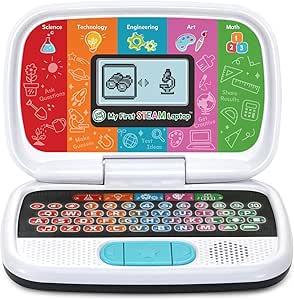 | Best for Early STEAM Exploration | Age range: 3 years and up | Activities: Plant growth, inventions, robot building, shape matching, creative designs, and counting | Educational objectives: Early development, logical thinking, motor skills, STEAM, and shape recognition | VIEW LATEST PRICE | See Our Full Breakdown |
| LeapFrog LeapStart Preschool Success Interactive Learning System, Green |  | Best for Book-Based Skill Building | Age range: 2–7 years | Included books: Scout and Friends Math With Problem-Solving activity book and one additional activity book | Included components: LeapStart system, stylus, USB cable, quick start guide, and two activity books | VIEW LATEST PRICE | See Our Full Breakdown |
| LeapFrog Spin and Sing Alphabet Zoo |  | Best for Baby’s First Letter Play | Age range: 6–36 months | Play modes: Letter, animal, and music | Learning topics: Letters A–Z, animal names and sounds, colors, and shapes | VIEW LATEST PRICE | See Our Full Breakdown |
| LeapFrog Mr. Pencil Scribble, Write and Read, Green |  | Best for Early Writing Practice | Age range: 3 years and up | Recommended age: 36 months–5 years | Activities: Letter and number tracing, picture tracing, word building, sound-it-out activities, name practice, and free drawing | VIEW LATEST PRICE | See Our Full Breakdown |
| LeapFrog LeapStart Learning Success Bundle, Green |  | Best Ready-to-Start Learning Bundle | Age range: 2–5 years | Included books: Go! Go! Cory Carson Superhero School book and one additional activity book | Included components: LeapStart system, two books, stylus, USB cable, and quick start guide | VIEW LATEST PRICE | See Our Full Breakdown |
| leapfrog educational toy | Age range | Power | Included components |
|---|---|---|---|
| LeapFrog Mr. Pencil’s Scribble | 3+ years | — | Mr. Pencil’s Scribble and Write, Parent’s Guide |
| LeapFrog Disney and Pixar Toy | 3+ years | — | Explore & Learn Lilypad, Quick Start Guide |
| LeapFrog 2-in-1 LeapTop Touch | 2–5 years | — | — |
| LeapFrog LeapPad Academy Kids’ | 3–8 years | — | Tablet, removable silicone bumper with kickstand, stylus, USB Type-C cable, wall adapter, quick start guide, instruction manual |
| LeapFrog LeapReader Learn-to-R | 4–8 years | — | — |
| LeapFrog Leapster Ultra Handhe | 4+ years | 4 AA batteries | — |
| LeapFrog Magic Adventures Inte | 5–12 years | 4 AA batteries | Globe, USB cord, parent’s guide |
| LeapFrog Touch and Learn eRead | — | 3 AA batteries | — |
| LeapFrog My First ABC Tablet T | 12 months to 3 years | 3 AAA batteries | My First ABC Tablet and Quick Start Guide |
| LeapFrog LeapMove Active Learn | 4–7 years | USB powered; corded electric | — |
| LeapFrog My First STEAM Laptop | 3 years and up | 2 AA batteries; included for demo use | My First STEAM Laptop and Quick Start Guide |
| LeapFrog LeapStart Preschool S | 2–7 years | 2 AA batteries; included | LeapStart system, stylus, USB cable, quick start guide, and two activity books |
| LeapFrog Spin and Sing Alphabe | 6–36 months | 3 AA batteries; included | — |
| LeapFrog Mr. Pencil Scribble | 3 years and up | 3 AA batteries | Mr. Pencil’s Scribble, Write and Read and Quick Start Guide |
| LeapFrog LeapStart Learning Su | 2–5 years | 2 AA batteries; included | LeapStart system, two books, stylus, USB cable, and quick start guide |
More Details on Our Top Picks
LeapFrog Mr. Pencil’s Scribble and Write, Pink
Mr. Pencil’s Scribble and Write is the most focused choice here for preschoolers starting to form letters and numbers. Its six activities pair step-by-step tracing with feedback, then extend practice into shapes, drawing, letter sounds, and simple spelling. That progression gives a child more than a tracing pad without the breadth or screen-like feel of the LeapPad Academy. Compared with the LeapFrog 2-in-1 LeapTop Touch, this toy puts more emphasis on guided pen control and less on pretend computer play. The tradeoff is a narrower learning focus: it is not a broad reading program like the LeapReader bundle, and regular use requires three AA batteries. I’d choose it for short, hands-on writing practice, not as a single toy meant to cover every early-learning subject.
Pros:- Six activities combine tracing, drawing, and early spelling.
- Step-by-step prompts and feedback support independent practice.
- Letter sounds and simple words add early literacy to handwriting play.
- Stylus drawing activities give children a creative break from tracing.
Cons:- Three AA batteries are required for regular use.
- Its writing-centered activities offer less subject variety than the LeapPad Academy.
Best for: Preschool families seeking guided letter, number, and shape tracing with a little drawing and early spelling.
Not ideal for: Buyers looking for a broad curriculum, reading books, or a rechargeable device; this toy focuses on tracing and needs three AA batteries.
- Age range:3+ years
- Activities:6
- Learning focus:Tracing, drawing, letter sounds, and simple spelling
- Material:Plastic
- Batteries:3 AA batteries required
- Included components:Mr. Pencil’s Scribble and Write, Parent’s Guide
- Model number:80-600860
- Warranty:90 days against manufacturer defects
Our verdict“Choose Mr. Pencil’s Scribble and Write for a preschooler who needs guided handwriting practice more than a broad learning device.”
LeapFrog Disney and Pixar Toy Story 5 Explore & Learn Lilypad
The Explore & Learn Lilypad uses familiar Toy Story characters to make letters, counting, puzzles, and music feel like one playful experience. Its movable hands shift the toy’s eyes, while emoji and preset-message interactions give children a simple way to connect with characters without open-ended typing. That makes it a more character-led option than the LeapFrog 2-in-1 LeapTop Touch, which centers on a pretend laptop format and customizable name spelling. The Lilypad also reaches counting to 100, giving it more number range than a basic alphabet toy. The tradeoff is that messaging stays limited to preset choices, and the product information recommends fresh AA batteries for regular play. I’d pick it for a Toy Story fan who enjoys varied short activities, rather than a child seeking sustained reading instruction like the LeapReader bundle offers.
Pros:- Combines letters, counting to 100, problem-solving, and music.
- Character-themed emojis and preset messages add playful interaction.
- Movable hands make the toy’s eyes move for an engaging physical detail.
- Offers a wider activity mix than a tracing-focused toy such as Mr. Pencil’s Scribble and Write.
Cons:- Messaging is limited to emojis and preset messages.
- New AA batteries are recommended for regular use.
Best for: Toy Story-loving preschoolers who want character interactions alongside early letters, counting, puzzles, and music.
Not ideal for: Families seeking open-ended messaging or structured reading practice; the messages are preset, and reading instruction is not its main focus.
- Age range:3+ years
- Learning activities:Letters, counting to 100, problem-solving, and music
- Character theme:Disney and Pixar Toy Story 5
- Interactive feature:Movable hands make the eyes move
- Batteries:2 AA batteries; included for demonstration purposes only
- Included components:Explore & Learn Lilypad, Quick Start Guide
- Model number:80-623500
Our verdict“Pick the Lilypad for a Toy Story fan who prefers varied character-based activities over focused tracing or reading lessons.”
LeapFrog 2-in-1 LeapTop Touch Learning Toy
The 2-in-1 LeapTop Touch suits children who want their own laptop-style toy but are not ready for an open-ended computer. Its swiveling screen changes the toy from keyboard to tablet mode, and five learning modes cover ABCs, numbers, games, music, and messages. Customizable name spelling adds a personal touch, while the carry handle makes it easy to bring along. Compared with the Lilypad, the LeapTop leans more into familiar computer play; unlike Mr. Pencil’s Scribble and Write, it does not center on guided letter tracing. That flexibility comes with a broader but less specialized learning experience, and the activities are designed for ages 2–5. It also needs three AA batteries for regular use. I’d favor it for pretend laptop play, not for a child who needs dedicated handwriting or early-reading practice.
Pros:- Swiveling screen converts between keyboard and tablet modes.
- Five learning modes cover letters, numbers, games, music, and messages.
- Customizable name spelling adds a personal early-literacy activity.
- Carry handle and compact form support portable play.
Cons:- Three AA batteries are required for regular use.
- Its activities are designed for ages 2–5, limiting its fit as children grow.
- It offers less guided handwriting practice than Mr. Pencil’s Scribble and Write.
Best for: Families with children ages 2–5 who want portable pretend-computer play with basic letters, numbers, games, and music.
Not ideal for: Older children or families focused on systematic handwriting and reading instruction; its play and learning content is designed for ages 2–5.
- Age range:2–5 years
- Learning modes:ABCs, numbers, games, music, and messages
- Keyboard:Letters A–Z and number buttons 1–10
- Batteries:3 AA batteries; included for demonstration
- Dimensions:2.05 × 10.08 × 6 inches
- Weight:1.3 pounds
- Players:1
- Model number:80-600900
Our verdict“Choose the LeapTop Touch for a young child drawn to pretend computer play, rather than a dedicated writing or reading toy.”
LeapFrog LeapPad Academy Kids’ Learning Tablet, Green
The LeapPad Academy is the broadest learning device in this group, with more than 20 educator-approved apps spanning reading, math, writing, coding, problem-solving, and creativity. Its 7-inch shatter-safe screen, stylus, and bumper with kickstand suit children who benefit from a more substantial tablet setup. Parental controls for time limits and app management also give caregivers more oversight than the simpler LeapTop Touch or character-led Lilypad. That range makes the LeapPad a stronger fit for families seeking several learning subjects in one device, though it is less focused than Mr. Pencil’s tracing activities or the LeapReader’s book-based reading practice. The tradeoff is ongoing content cost: additional material is sold separately, and LeapFrog Academy requires a subscription after the three-month trial. I’d choose it for managed, multi-subject tablet learning, not for screen-free play.
Pros:- More than 20 educator-approved apps cover several learning subjects.
- Parental controls support time limits and app management.
- Shatter-safe screen, stylus, and bumper with kickstand come in the box.
- Covers a broader age range and subject mix than the LeapTop Touch.
Cons:- Additional games, videos, music, and eBooks are sold separately.
- LeapFrog Academy content requires a subscription after the three-month trial.
Best for: Families with children ages 3–8 who want a multi-subject learning tablet with parental controls and a protective stand.
Not ideal for: Buyers seeking a screen-free toy or a complete ongoing content library without separate purchases or a subscription.
- Age range:3–8 years
- Screen size:7 inches
- Operating system:Android 10
- Connectivity:Wi-Fi 802.11n, USB
- Dimensions:8.5 × 5.9 × 0.6 inches
- Cameras:Rear: 2 MP; front: 0.3 MP
- Battery:Rechargeable lithium-ion
- Included components:Tablet, removable silicone bumper with kickstand, stylus, USB Type-C cable, wall adapter, quick start guide, instruction manual
- Warranty:2-year limited warranty
Our verdict“Choose the LeapPad Academy if you want one supervised device for multiple learning subjects and accept separate content costs.”
LeapFrog LeapReader Learn-to-Read 10-Book Bundle, Pink
For a child beginning to decode words, the LeapReader 10-book bundle offers the clearest reading path in this lineup: a touch-sensitive pen works with ten books to practice letter sounds, short vowels, sight words, spelling, and word blending. Read-along stories and activities make the books interactive while keeping the learning centered on print, unlike the screen-based LeapPad Academy. It is also more reading-specific than Mr. Pencil’s Scribble and Write, which introduces sounds and simple spelling but focuses on tracing and drawing. The tradeoff is that the bundle’s depth depends on its books: extra titles are sold separately, and its 2.5-pound listed weight makes the set less convenient to carry than the LeapTop Touch. I’d choose it for a child ready to practice early reading with physical books, not for families wanting broad subjects in one device.
Pros:- Pairs a LeapReader pen with 10 interactive early-reading books.
- Practices letter sounds, vowels, sight words, spelling, and word blending.
- Read-along stories and activities connect audio support with printed text.
- Compatible with additional LeapReader books.
Cons:- Additional books are sold separately.
- Requires two AAA batteries.
- The listed 2.5-pound weight makes it less portable than the LeapTop Touch.
Best for: Children ages 4–8 who are learning letter sounds, short vowels, sight words, spelling, and word blending through interactive books.
Not ideal for: Families seeking a multi-subject tablet or a compact travel toy; the set is reading-focused, and additional books are sold separately.
- Age range:4–8 years
- Included books:10
- Learning focus:Letter sounds, short vowels, sight words, spelling, and word blending
- Batteries:2 AAA batteries included
- Operation mode:Manual
- Power source:Battery powered
- Dimensions:6.61 × 1.26 × 1.18 inches
- Weight:2.5 pounds
- Warranty:90 days against manufacturer defects
Our verdict“Pick the LeapReader bundle for a budding reader who will benefit more from interactive books than from a general-purpose learning tablet.”
LeapFrog Leapster Ultra Handheld Learning Game Console for Kids Ages 4+
The Leapster Ultra suits families who want a dedicated learning game system without needing a TV, Wi-Fi, downloads, or account setup. Its 30+ games and 1,200+ challenges cover early spelling, counting, phonics, and problem-solving across three skill levels, giving it broader practice than the story-led Touch and Learn eReader. A rotating screen, spinner, and two profiles add variety and let siblings keep separate progress. Compared with LeapMove, the Leapster is more portable and ready to play on its own, while LeapMove turns learning into movement on a TV. The tradeoff is that the Leapster targets preschool and kindergarten skills rather than older learners, and its four AA batteries may need regular replacement. I’d choose it for focused, self-contained play, not for a toy that grows far beyond early school skills.
Pros:- Works without internet, downloads, or account setup
- More than 30 games and 1,200+ challenges cover literacy, math, and problem-solving
- Two profiles keep separate players’ progress
- Rotating screen and spinner add play options beyond button-based games
Cons:- Requires four AA batteries, with new batteries recommended for regular use
- Learning content is aimed at preschool and kindergarten levels
- A handheld screen offers less whole-body activity than LeapMove
Best for: Families seeking an offline handheld for preschool or kindergarten practice, especially when two children need separate saved profiles.
Not ideal for: Older children who have moved beyond early literacy and math, or families who prefer rechargeable toys and want to avoid AA batteries.
- Age range:4+ years
- Games:30+
- Learning challenges:1,200+
- Skill levels:3
- Player profiles:2
- Screen:4.3-inch LCD
- Power:4 AA batteries
- Dimensions and weight:7.3 × 1.9 × 4.0 inches; 10.88 ounces
Our verdict“Choose the Leapster Ultra for offline, portable early-learning games with separate profiles; skip it if your child needs more advanced content or you want motion-based play.”
LeapFrog Magic Adventures Interactive Globe
The Magic Adventures Globe is the most place-focused choice here: children use a stylus to explore geography, cultures, animals, and habitats, with BBC videos and animations adding context to locations. Its 10-inch globe gives this toy a physical, spatial quality that the screen-based Leapster Ultra and Touch and Learn eReader do not offer. Three games and quizzes give children ways to revisit what they discover, while the small built-in screen keeps the experience tied to the globe rather than turning it into a general tablet. That focus is also its main limit: the 2.8-inch screen is compact for video, and this is less suited to daily phonics or math practice than Leapster. I’d pick it for a curious child who likes maps and world topics, not as a broad first learning toy.
Pros:- Combines a physical globe with stylus-based interactive exploration
- Covers geography, cultures, animals, habitats, and other world topics
- BBC videos and animations add visual context to places
- Three games and quizzes support exploration and recall
Cons:- The 2.8-inch screen is small for videos and animations
- Requires four AA batteries for regular use; included batteries are for demo use
- Geography focus offers less direct literacy and math practice than Leapster Ultra
Best for: Children ages 5–12 who are curious about maps, animals, cultures, and world geography and enjoy guided exploration with a stylus.
Not ideal for: Families prioritizing early reading and math drills, or children who need a large screen for watching video and animations.
- Age range:5–12 years
- Globe size:10 inches
- Screen:2.8 inches
- Power:4 AA batteries
- Included components:Globe, USB cord, parent’s guide
- Material:Plastic
- Dimensions:11 × 10 × 14 inches
- Weight:2.9 pounds
Our verdict“Choose the Magic Adventures Globe for hands-on world exploration, but pick Leapster Ultra or the eReader if core early-reading practice matters more.”
LeapFrog Touch and Learn eReader, Teal
The Touch and Learn eReader is a natural fit for preschoolers drawn to stories, with 10 titles split between five classic fairy tales and five phonics-focused stories. Touchscreen activities, quizzes, games, and music make the stories more participatory than a standard read-along. Its vowel and word-building exercises give it a clearer early-literacy emphasis than the Magic Adventures Globe, which is built around geography, and a more story-centered feel than the game-heavy Leapster Ultra. The tradeoff is a narrower learning scope: families looking for broad math and problem-solving coverage may prefer Leapster, while toddlers may find the eReader less suited to their stage than My First ABC Tablet. It also uses three AA batteries, and the supplied batteries are for demonstration. I’d choose this for a child ready to connect stories with letter sounds and simple word building.
Pros:- Includes five classic fairy tales and five phonics-focused stories
- Touchscreen activities combine reading with games, quizzes, and music
- Vowel and word-building activities support early literacy practice
- USB connectivity and listed 32 GB storage
Cons:- Requires three AA batteries; included batteries are for demonstration
- Story and phonics focus is narrower than Leapster Ultra’s mix of skills
- Less suited to toddlers than My First ABC Tablet
Best for: Preschoolers who enjoy interactive stories and are ready to practice vowel sounds, phonics, and early word building.
Not ideal for: Toddlers needing simpler first-letter play, or families wanting a wider mix of math, geography, and problem-solving activities.
- Recommended age:3 years and up
- Stories:10: five classic fairy tales and five phonics stories
- Display:LCD
- Input:Touchscreen
- Connectivity:USB
- Storage:32 GB
- Power:3 AA batteries
- Dimensions and weight:8.8 × 6.3 × 1.2 inches; 14.4 ounces
Our verdict“Pick the Touch and Learn eReader for story-driven phonics and word building, rather than broad skill practice or toddler-first play.”
LeapFrog My First ABC Tablet Toddler Learning Toy
For a toddler just beginning to notice letters, the My First ABC Tablet keeps the interaction simple: bright backlit buttons introduce letters, words, and colors, while Scout and Violet guide stories about familiar places such as a farm or beach. The ABC song and music add listening and movement cues without asking a young child to manage a more involved game system. Compared with the Touch and Learn eReader, this is the earlier-stage pick; the eReader is better for story sequences, phonics activities, and word building. It also asks less of a child than the Leapster Ultra, which offers a much larger set of games and challenges for preschool and kindergarten learners. The tradeoff is limited depth as a child grows, plus three AAA batteries for regular use. I’d choose it as a first letter-and-language toy, not a long-term learning console.
Pros:- Bright backlit buttons make early letter and color play accessible
- Scout and Violet lead interactive stories featuring familiar settings
- ABC song and music support listening and early language play
- Designed for toddler-age learning, including letter recognition and motor skills
Cons:- Requires three AAA batteries; included batteries are for demonstration
- Offers less advanced reading practice than the Touch and Learn eReader
- Limited appeal as children move into preschool-level games and challenges
Best for: Families introducing letters, colors, and simple listening activities to children ages 12 months to 3 years.
Not ideal for: Preschoolers ready for phonics and word-building challenges, or families seeking a toy that will serve through kindergarten.
- Age range:12 months to 3 years
- Model number:80-622900
- Educational objectives:Early phonics, language development, letter recognition, listening comprehension, motor skills, and pre-reading skills
- Power:3 AAA batteries
- Material:Plastic
- Dimensions:8.3 × 6.3 × 1.1 inches
- Weight:11.84 ounces
- Included components:My First ABC Tablet and Quick Start Guide
Our verdict“Choose My First ABC Tablet for a toddler’s first playful exposure to letters and words, then move to a more challenging option as skills develop.”
LeapFrog LeapMove Active Learning Video Game System
LeapMove brings learning off a handheld screen: children move their bodies to play through adventures covering math, spelling, phonics, reading, and problem-solving. With 25 preloaded games and adventures, three learning levels, and progress saving for up to three players, it suits siblings or families who want activity-based play on a shared TV. That makes it a different proposition from the Leapster Ultra, which is portable and works without a television, and the Magic Adventures Globe, which focuses on geography rather than movement. LeapMove’s main tradeoff is setup and dependence on a display: it needs a TV and the included HDMI and USB cables. Additional games require downloads, so it is less self-contained than the Leapster. I’d choose it when active, shared play is the priority; skip it if you need a toy children can use anywhere.
Pros:- Motion-controlled play encourages active movement
- Covers math, spelling, phonics, reading, and problem-solving
- Three learning levels and saved progress support up to three players
- Includes HDMI and USB cables for connecting to a TV
Cons:- Requires a TV for display and is not a portable handheld option like Leapster Ultra
- Additional games must be downloaded
- Corded USB power limits play to a setup near the display
Best for: Families with a TV who want children ages 4–7 to practice school skills through movement, with saved progress for up to three players.
Not ideal for: Households without a suitable TV, or families seeking a portable, standalone toy that works without downloads.
- Age range:4–7 years
- Players:Up to 3
- Included games:25 preloaded games and adventures
- Controller type:Motion
- Connection:HDMI and USB
- Power:USB powered; corded electric
- Memory storage:4 GB
- Dimensions and weight:2.6 × 2.6 × 2.8 inches; 0.29 kg
Our verdict“Choose LeapMove for TV-based, active learning shared by several children, but pick Leapster Ultra for portable play without setup.”
LeapFrog My First STEAM Laptop
The My First STEAM Laptop earns this role by introducing several subjects in one guided toy: children can explore plant growth, inventions, robot building, shapes, creative design, and counting. Its animations and prompts give preschoolers a way to try ideas without needing an adult to explain every activity. Compared with Mr. Pencil Scribble, Write and Read, which concentrates on early writing and literacy, this laptop spreads practice across broader STEAM themes. That variety suits children who enjoy switching between activities, though it offers less focused tracing practice than Mr. Pencil. It is a single-player, battery-powered toy, so it is better for individual exploration than shared play. The included AA batteries are for demonstration, and new ones are recommended for regular use.
Pros:- Covers several introductory STEAM topics in one toy
- Guided animations help children follow activities independently
- Mixes counting, shape recognition, creative tasks, and problem-solving
Cons:- New AA batteries are recommended for regular play
- Designed for one player, limiting shared play
Best for: Preschoolers who like varied, guided activities across counting, shapes, creativity, and introductory science and engineering topics
Not ideal for: Families looking for a writing-focused toy, a multiplayer activity, or a device that avoids ongoing battery replacement
- Age range:3 years and up
- Activities:Plant growth, inventions, robot building, shape matching, creative designs, and counting
- Educational objectives:Early development, logical thinking, motor skills, STEAM, and shape recognition
- Number of players:1
- Power:2 AA batteries; included for demo use
- Material:Plastic
- Dimensions:9.33 x 6.22 x 2.17 inches
- Included components:My First STEAM Laptop and Quick Start Guide
Our verdict“Choose this laptop for a preschooler who wants varied STEAM-themed play, but pick Mr. Pencil for more direct letter and number tracing.”
LeapFrog LeapStart Preschool Success Interactive Learning System, Green
The LeapStart Preschool Success is the strongest fit here for families who want learning activities anchored in books rather than a standalone screen-like toy. Children use the stylus on touch-and-talk pages for games, puzzles, and creative challenges spanning reading, math, and problem-solving. It includes two activity books, and many activities have two levels, giving children room to revisit familiar pages with added challenge. Compared with the LeapStart Learning Success Bundle, this model is described for ages 2–7 rather than 2–5, so it may suit a wider preschool-to-early-school age span. The tradeoff is that expanding the library takes extra setup: additional books are sold separately, and downloading them requires a computer and internet connection. It is a better match for families comfortable managing that digital step than for buyers seeking a ready-to-use, self-contained toy.
Pros:- Touch-and-talk books combine games, puzzles, and creative challenges
- Includes two activity books and a stylus
- Activities support reading, counting, math, and problem-solving
- Many activities offer two levels of play
Cons:- Additional activity books are sold separately
- Downloading additional books requires a computer and internet connection
Best for: Families with children ages 2–7 who want tactile book activities across reading, math, and problem-solving, with room to add books later
Not ideal for: Caregivers who want a complete, no-setup activity library or do not have access to a computer and internet for additional downloads
- Age range:2–7 years
- Included books:Scout and Friends Math With Problem-Solving activity book and one additional activity book
- Included components:LeapStart system, stylus, USB cable, quick start guide, and two activity books
- Power:2 AA batteries; included
- Additional content requirement:Computer and internet connection required to download additional books
- Material:Plastic
- Model number:80-602170
- Warranty:90 days against manufacturer defects
Our verdict“Pick this system for book-centered learning across a broad preschool age range if computer-based content setup is acceptable.”
LeapFrog Spin and Sing Alphabet Zoo
For the youngest children in this group, the Spin and Sing Alphabet Zoo makes early learning physical and brief: babies can spin, slide, and press features while hearing letters, animal names and sounds, colors, and shapes. Its three modes—letter, animal, and music—let caregivers shift the focus without moving to a different toy. Compared with the My First STEAM Laptop, it is aimed at a much younger age range and relies more on sensory cause-and-effect than guided topic exploration. That makes it a more age-appropriate starting point for babies, but a short-lived choice as a child grows into longer, more complex activities. It also runs on three AA batteries. This is a simple, one-player introduction to letters and fine motor practice, not a substitute for the broader learning system offered by LeapStart.
Pros:- Three modes introduce letters, animals, and music
- Light-up buttons and sound responses encourage exploration
- Spinning, sliding, and pressing provide hands-on motor practice
Cons:- The 6–36 month age range makes it a short-term choice as children grow
- Requires three AA batteries
Best for: Caregivers seeking an interactive first alphabet toy for babies and toddlers who enjoy pressing, spinning, and sound responses
Not ideal for: Families shopping for a toy that will suit preschoolers beyond age 3 or provide extended book-based lessons and puzzles
- Age range:6–36 months
- Play modes:Letter, animal, and music
- Learning topics:Letters A–Z, animal names and sounds, colors, and shapes
- Power:3 AA batteries; included
- Number of players:1
- Material:Plastic
- Dimensions:6.5 x 7.13 x 8.46 inches
- Weight:1.9 pounds
Our verdict“Choose the Alphabet Zoo as an active first letter toy for babies and young toddlers, not as a longer-term preschool learning system.”
LeapFrog Mr. Pencil Scribble, Write and Read, Green
Mr. Pencil Scribble, Write and Read is the most focused choice here for children ready to practice forming letters and numbers. A stylus guides uppercase and lowercase letter tracing, number writing, and picture drawing; animations then turn traced characters into objects, connecting hand movements with sounds and word practice. Name practice and free drawing add some room for personal expression, but the core appeal is structured early writing. Compared with the My First STEAM Laptop, it covers less topic variety and gives up broad activities such as plant growth and robot building in favor of literacy and tracing. That focus is useful for children preparing for writing, but less compelling for buyers who want open-ended subject variety. It needs three AA batteries, and its stated age range of 3+ makes it a preschool-focused rather than long-term school-age toy.
Pros:- Guided tracing covers uppercase and lowercase letters, numbers, and pictures
- Animated responses connect tracing with sounds, words, and counting
- Name practice and free drawing add variety to structured exercises
Cons:- Requires three AA batteries, with new batteries recommended for regular use
- Its early-childhood focus offers less subject variety than the My First STEAM Laptop
Best for: Preschoolers ages 3–5 who are beginning to trace letters, numbers, and their own names with a guided stylus
Not ideal for: Families seeking broad STEAM topics, book-based activities, or a toy that remains age-appropriate well beyond early childhood
- Age range:3 years and up
- Recommended age:36 months–5 years
- Activities:Letter and number tracing, picture tracing, word building, sound-it-out activities, name practice, and free drawing
- Power:3 AA batteries
- Material:Plastic
- Included components:Mr. Pencil’s Scribble, Write and Read and Quick Start Guide
- Model number:80-617000
- Warranty:90 days against manufacturer defects
Our verdict“Choose Mr. Pencil for guided preschool writing practice; choose the My First STEAM Laptop for a wider mix of learning topics.”
LeapFrog LeapStart Learning Success Bundle, Green
The LeapStart Learning Success Bundle is the book-based pick for families who want several activity types and a portable system for ages 2–5. Its two included books pair with a stylus for touch-and-talk games, puzzles, and challenges across reading, counting, and problem-solving. Many activities have multiple levels, so children can return to pages as their skills develop; the carrying handle and stylus storage also make it easier to take the system between rooms or on trips. Compared with the Preschool Success Interactive Learning System, this bundle has a narrower stated age range, but its listed contents include two books and the USB cable needed for content installation. The main catch is setup: installing content requires a Windows or Mac computer and internet access, while extra books are sold separately. It suits families who value tactile book play more than a fully self-contained toy.
Pros:- Includes two activity books, a stylus, and a USB cable
- Touch-and-talk pages offer games, puzzles, and creative challenges
- Many activities include multiple levels for revisiting skills
- Stylus storage and a carrying handle support portability
Cons:- Content installation requires a Windows or Mac computer and internet connection
- Additional activity books are sold separately
Best for: Families with children ages 2–5 who want a portable, book-based learning set with two included books and activities that can grow in challenge
Not ideal for: Caregivers without access to a Windows or Mac computer and internet, or buyers who want all future activity books included
- Age range:2–5 years
- Included books:Go! Go! Cory Carson Superhero School book and one additional activity book
- Included components:LeapStart system, two books, stylus, USB cable, and quick start guide
- Power:2 AA batteries; included
- Content installation:Windows or Mac computer and internet connection required
- Learning activities:Reading, counting, problem-solving, games, puzzles, and challenges
- Model number:80-613100
- Warranty:90 days against manufacturer defects
Our verdict“Choose this bundle for portable, tactile book activities for ages 2–5 if you are prepared for computer-based content setup.”

How We Picked
I compared these 15 LeapFrog toys by the kind of learning they support, how directly children can use them, and how well their format fits different ages and play habits. I also considered whether a toy focuses on one skill or offers a wider range of activities, what materials come in the box, and whether the product may depend on compatible books, software, or accessories. Screen use, portability, active play, and the likelihood that a child can return to the toy for varied activities shaped the assessment.
The ranking favors options with a clear learning purpose and useful flexibility, which puts the LeapStart Preschool Success system first for its book-based approach and puts targeted picks like Mr. Pencil higher for buyers with a specific goal. The tablet, game console, globe, and active-play system rank for their distinct strengths rather than as substitutes for every child. Simpler alphabet toys suit younger beginners, but their narrower scope places them below systems with broader learning paths. I treat bundles as stronger fits when included materials reduce the need to select add-ons separately, while noting that a larger feature set is not automatically better for every family.
Factors to Consider When Choosing Best Leapfrog Educational Toys
LeapFrog toys can look similar on a shelf while asking children to learn in very different ways. Before choosing, match the toy’s format to your child’s current skills, attention span, and your household’s approach to screens and add-on materials.
Match the toy to one learning goal
Start by naming the skill you want the toy to support: early letters, handwriting, reading, numbers, geography, or a wider mix. A focused toy can make practice easier to return to because the activity is clear and repeatable. A broader system can offer more variety, but its many options may be less useful if your child is not ready for them. Avoid choosing a toy only because it lists several subjects; check whether those activities fit what your child is learning now. If needs are likely to change soon, a system that works with multiple books or activities may offer a longer path than a single-skill device.
Check age fit and independence
Age labels offer a starting point, but a child’s reading ability, fine-motor control, and comfort with independent play matter just as much. Younger children often benefit from large, direct controls and simple cause-and-effect interactions. Older preschoolers may be ready for tracing, reading activities, or less guided exploration. A toy that requires frequent adult help can be a good shared activity, but it may frustrate a child expected to use it alone. Check the activity style and instructions before buying, especially when the toy will be a gift and you cannot observe the child using it first.
Decide how much screen-style play fits your home
LeapFrog’s lineup spans simple buttons and interactive books through tablets, handheld games, and active video play. Decide whether you want a device that feels like a screen, a more tactile activity, or a mix before comparing individual features. A screen-based toy may suit a child who enjoys guided digital activities, while a book-based system can feel closer to shared reading. Also check what parental controls, setup steps, and power requirements apply to the specific model. A common mistake is treating every electronic learning toy as equivalent; the format changes how children engage and how adults supervise.
Look beyond the device to included content
For interactive systems, the device is only part of the purchase decision: included books, cartridges, apps, or other materials determine what a child can do right away. Bundles can be convenient when they include content that matches the child’s level, but a larger bundle is not useful if its topics do not interest them. For a standalone system, confirm what is included and whether compatible materials are sold separately. Check compatibility carefully, since content for one LeapFrog platform may not work with another. Choosing content first can prevent paying for features your child will not use.
Balance variety against ease of use
More activities can extend a toy’s usefulness, but a complicated menu or many modes can make it harder for a young child to start playing. For a first learning toy, favor clear feedback and controls the child can manage with little help. Children who already enjoy guided games may make better use of a more feature-rich device. Consider where the toy will be used, too: a portable handheld suits different routines than a larger system intended for a play area. The right choice is the one your child can access and return to, not necessarily the one with the longest feature list.
Plan for durability, upkeep, and sharing
Young children may carry toys between rooms, press buttons repeatedly, or share them with siblings, so look for a design that suits your household’s handling habits. Check whether the toy needs batteries, charging, cleaning, or adult setup, and factor that routine into daily use. If siblings will share it, consider whether activities work for more than one age or whether turn-taking could be difficult. Small books and accessories can be misplaced, so a storage plan may matter as much as the toy itself. These practical details often determine whether a learning toy stays in rotation after its first few play sessions.
Frequently Asked Questions
Which LeapFrog toy is the best starting point for a preschooler?
Choose based on the child’s current interest and skill, rather than assuming one toy suits every preschooler. The LeapStart Preschool Success system is a strong starting point for families who want guided activities in a book-based format. Mr. Pencil’s Scribble and Write is a more focused choice when letter formation is the main goal, while simple options like My First ABC Tablet are better suited to early, basic interaction. Check the age guidance and activity difficulty before buying. A toy the child can use with little frustration is more likely to become part of regular play.
Do I need to buy extra books or content for LeapStart and LeapReader toys?
It depends on the exact product and what is included in its package. Bundles such as the LeapReader Learn-to-Read 10-Book Bundle and LeapStart Learning Success Bundle provide materials alongside the core system, while a standalone device may offer a narrower set of activities out of the box. Check the product’s included-content list and confirm compatibility before adding books or other materials. Do not assume that content from one LeapFrog system works with another. If you want a ready-to-use gift, an included bundle can simplify the choice.
Which option makes the most sense if I want to limit screen-style play?
Look toward interactive books and tactile activity toys rather than tablet or video-game formats. The LeapStart systems and LeapReader are more book-centered, while options such as the LeapPad Academy, Leapster Ultra, and LeapMove are more clearly screen- or game-oriented. Keep in mind that electronic feedback can still be part of a book-based toy, so check the product format rather than relying on the word “educational.” If your goal is to avoid screens entirely, compare the toy’s actual interaction method and plan how it fits alongside non-electronic play.
Should I choose a focused toy or a system with several learning activities?
A focused toy is often the better choice when a child is practicing one specific skill, such as tracing letters or learning basic alphabet sounds. A multi-activity system makes more sense when the child enjoys variety or the family wants one platform for different topics. Broader systems can require more adult setup or additional content, so the feature range may not translate into more use. Think about how your child plays: repeated practice favors a focused activity, while frequent switching may suit a wider system. Buying for a real learning goal is usually more useful than buying the toy with the most modes.
What should I check before choosing a LeapFrog toy as a gift?
Confirm the recipient’s age, current interests, and whether the family is comfortable with a tablet or game-style device. Then check what comes in the box, including books or other materials, and whether the toy needs batteries, charging, or setup before play. For a child whose preferences are uncertain, a simple alphabet toy or a book-based option can be easier to match than a specialized gaming format. If you are considering a system, verify that any extra content you plan to give is compatible. These checks help prevent a thoughtful gift from arriving incomplete or mismatched to the child.
Conclusion
For the strongest all-around fit, I recommend the LeapStart Preschool Success Interactive Learning System; it pairs guided activities with a book-based format. My best value-style pick is the LeapStart Learning Success Bundle for buyers who want a system and included learning materials together, while the LeapPad Academy is the premium-style choice for families seeking a tablet-format experience. For beginners, I would start with the My First ABC Tablet or Spin and Sing Alphabet Zoo, depending on whether the child prefers direct tablet-like interaction or playful alphabet sounds. Choose Mr. Pencil’s Scribble and Write for early writing practice, the Magic Adventures Interactive Globe for geography, or the LeapMove for active play. Match the format and learning goal to the child, and the best pick becomes much clearer.