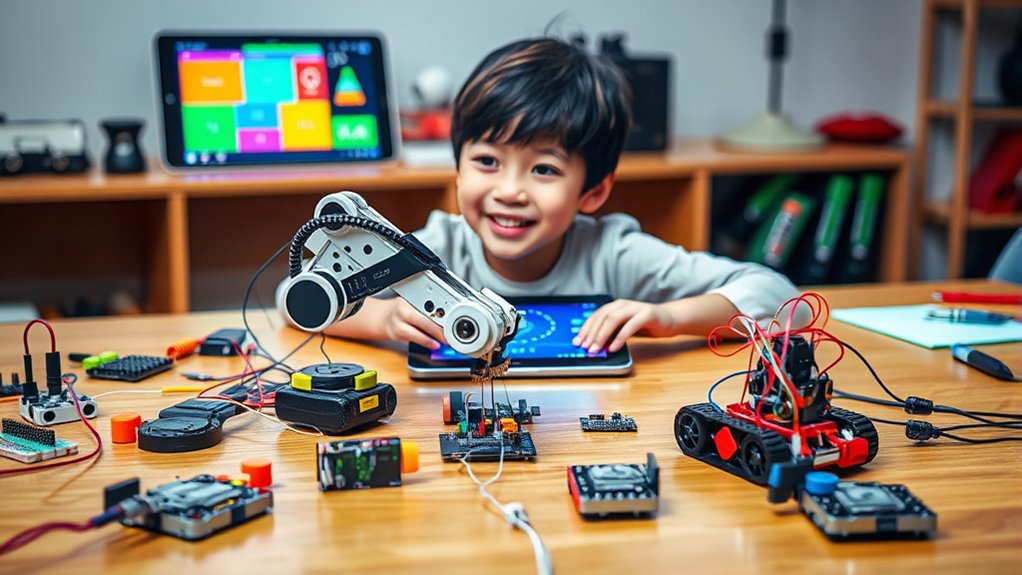

If you’re looking to boost a child’s creativity and coding skills in 2025, there are fantastic options like the Makerzoid kit with over 200 models, Makeblock’s mBot series, and the ELEGOO UNO R3 STEM kit. These kits offer various configurations, beginner to advanced programming, and durable build quality. They include sensors, remote control, and app compatibility to engage kids creatively. Stay with me to explore the top 15 kits that best suit different ages and skill levels.
Key Takeaways
- The list features diverse robot kits suitable for various ages, skill levels, and educational goals in 2025.
- It emphasizes kits with extensive programming options like Scratch, Python, and Arduino to foster coding skills.
- Durability, expandability, and compatibility with other devices are highlighted for long-term learning.
- Many kits include comprehensive educational content, tutorials, and hands-on building experiences to enhance STEM learning.
- The selection covers innovative features like app control, sensor integration, and creative projects to spark creativity.
Coding Robot Kit for Kids Ages 6+ with 200+ APP-Controlled Dinosaur Robot Toy and 47 Video Courses


If you’re looking for a robot coding kit that’s perfect for kids aged 6 and up, the Makerzoid Coding Robot Kit stands out with its impressive lineup of over 200 buildable models, including dinosaurs, cars, tanks, and airplanes. Made of safe ABS plastic, it helps kids develop imagination, logical thinking, and creativity. The kit includes 600+ blocks, compatible with other brands, and features an app-controlled system that lets children program and control their robots remotely. With 47 video courses, kids learn to build, code, and understand robotics concepts through hands-on activities, making it an engaging way to foster STEM skills in a fun, interactive way.
Best For: Kids aged 6 and up interested in building, coding, and exploring robotics through engaging, hands-on STEM activities.
Pros:
- Offers over 200 customizable models, including dinosaurs and vehicles, to encourage creativity and engineering skills.
- Includes 47 video courses and app control for interactive learning and programming practice.
- Made of safe ABS plastic and compatible with other building brands, ensuring durability and expandability.
Cons:
- Batteries (2x AA) are not included, requiring additional purchase.
- Requires a compatible device (not included) for app-controlled programming.
- Some advanced models may be challenging for younger children to assemble without adult assistance.
Makeblock mBot Robot Kit for Kids Ages 8-12, STEM Coding & Arduino Science Kit

The Makeblock mBot Robot Kit stands out as an excellent choice for kids aged 8 to 12 who are just starting their journey in robotics, electronics, and programming. It’s easy to assemble with clear instructions, taking about 15 minutes to build. The kit offers fun features like line-following and obstacle avoidance, controlled via remote or coding. Compatible with over 100 modules and LEGO parts, it encourages creativity and customization. With free apps and tutorials, kids can learn Scratch, Arduino, and more. It’s a perfect educational gift that combines hands-on building with coding skills, inspiring curiosity and STEM learning in a playful way.
Best For: Kids ages 8-12 interested in learning robotics, electronics, and programming through hands-on building and coding activities.
Pros:
- Easy to assemble with clear instructions, taking approximately 15 minutes.
- Supports extensive customization thanks to compatibility with over 100 modules and LEGO parts.
- Offers engaging tutorials and free apps to facilitate learning Scratch, Arduino, and robotics concepts.
Cons:
- Remote controller requires a CR2025 battery, which is not included.
- Requires 4 AA batteries for the robot, which are not included.
- Limited advanced features may not suit older or more experienced robotics enthusiasts.
ELEGOO UNO R3 Robot Car Kit for Arduino STEM Coding for Kids

Designed specifically for young beginners and aspiring robotics enthusiasts aged 8 to 16, the ELEGOO UNO R3 Robot Car Kit for Arduino STEM Coding makes learning hands-on programming and electronics engaging and achievable. It includes 24 modules like obstacle avoidance, line tracing, and infrared remote control, compatible with Android and iOS devices. The kit’s XH2.54 ports simplify assembly, reducing errors, while detailed tutorials guide users from setup to coding. Although designed for ages 8 and up, basic electronics knowledge helps. Weighing just 2.7 pounds, it’s perfect for hands-on STEM projects, fostering creativity, problem-solving, and coding skills in a fun, accessible way.
Best For: beginners and young robotics enthusiasts aged 8 to 16 who want to learn programming, electronics, and robotics through hands-on projects and easy-to-assemble modules.
Pros:
- Includes 24 diverse modules such as obstacle avoidance and line tracing for comprehensive learning.
- Compatibility with Android and iOS devices allows remote control via smartphones and tablets.
- Features XH2.54 ports for simplified assembly and error reduction, along with detailed tutorials to guide beginners.
Cons:
- Recommended age is 12+, so younger children may require additional guidance.
- Basic electronics knowledge is beneficial, which might be a barrier for absolute beginners.
- The kit may be limited for advanced users seeking more complex robotics projects.
Makeblock mBot Ranger 3-in-1 Robotics Kit for Kids

For kids aged 8 to 12 interested in exploring robotics, the Makeblock mBot Ranger 3-in-1 Robotics Kit stands out as a versatile and engaging choice. It offers three configurations—Land Raider, Nervous Bird, and Dashing Raptor—providing a range of fun and educational experiences. Building is simple with clear instructions, and programming is accessible through Scratch, Arduino, or mBlock5. The sturdy metal parts and sensors enable indoor and outdoor play, fostering skills in engineering, coding, and problem-solving. Whether for a gift or classroom activity, this kit encourages creativity, logical thinking, and hands-on learning, making robotics both fun and educational.
Best For: kids aged 8-12 interested in exploring and learning about robotics through hands-on building and programming activities.
Pros:
- Versatile with three different robot configurations for varied play and learning experiences
- Easy to assemble with clear instructions, suitable for collaborative projects between kids and parents
- Supports multiple programming languages including Scratch, Arduino, and mBlock5, catering to beginners and advanced users
Cons:
- Requires 6 AA or lithium batteries, which are not included in the package
- Some components and sensors may have a learning curve for complete beginners
- The kit’s complexity might be overwhelming for younger children at the lower end of the age range
Makeblock mBot2 Coding Robot for Kids

If you’re looking for a beginner-friendly robot coding kit that balances ease of use with advanced features, the Makeblock mBot2 stands out as an excellent choice for kids aged 8-12. It supports Scratch and Python, making it perfect for beginners and more experienced coders. Equipped with over 10 sensors, it can follow lines, avoid obstacles, and identify colors, while its CyberPi screen adds interactivity. Assembly takes about 30 minutes, and it’s built with durable materials. With Bluetooth, Wi-Fi, and USB control, kids can experiment with coding, IoT, and robotics projects easily. It’s a versatile, engaging tool that fosters creativity and critical thinking.
Best For: Kids aged 8-12 who are interested in learning coding, robotics, and STEM through a user-friendly, versatile, and interactive robot kit.
Pros:
- Supports beginner-friendly block coding with options to advance to Python, suitable for all skill levels.
- Equipped with over 10 sensors for diverse functions like line-following, obstacle avoidance, and color detection, enhancing hands-on learning.
- Easy to assemble in about 30 minutes with clear instructions, durable build quality, and multiple control options via Bluetooth, Wi-Fi, and USB.
Cons:
- The use of JST connectors for cables can be challenging for younger children or beginners unfamiliar with such connectors.
- Some advanced features may require additional modules or expansions, which could increase the overall cost.
- Requires a compatible device (tablet or computer) for programming and control, potentially limiting use without suitable technology.
Evo Entry Kit: Interactive Coding Robot for Kids

The Evo Entry Kit by Ozobot stands out as an ideal choice for young children just starting their journey into coding and robotics, thanks to its user-friendly setup and engaging activities. I love how easy it is to get started—calibration takes seconds, and no Wi-Fi is needed. The kit includes everything kids need to explore coding through online Blockly or screen-free Color Codes, making learning versatile and fun. With five skill levels, it grows with the child, fostering creativity and problem-solving. The durable robot and portable case make it perfect for both home and classroom use, providing hours of educational entertainment.
Best For: young children and beginners eager to explore coding and robotics in a fun, easy-to-use way suitable for both home and classroom environments.
Pros:
- User-friendly setup with quick calibration, no Wi-Fi required
- Offers versatile learning through online Blockly and screen-free Color Codes
- Durable design and portable case ideal for various settings
Cons:
- Some accessories may be challenging to assemble and connect
- Limited advanced programming features without additional apps
- Occasional sensitivity issues with color coding can affect activity flow
Sillbird Robot Building Kit with Remote Control, STEM Gift for Boys 8-13
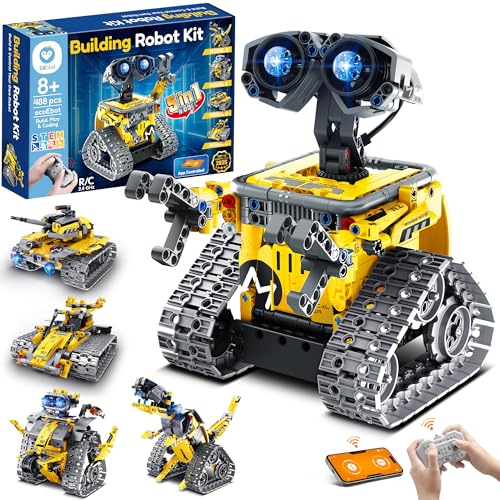
Parents and educators seeking an engaging STEM toy will find the Sillbird Robot Building Kit with Remote Control an excellent choice for children aged 8-13. This versatile set includes 488 pieces to build five different models, like robots, dinosaurs, cars, and tanks, with increasing difficulty levels. Kids can control their creations via Bluetooth app or remote, enabling programming, path creation, and precise movements. The detailed instructions and high-quality parts make assembly straightforward and fun, fostering confidence and creativity. With a perfect balance of challenge and play, this kit promotes hands-on learning, developmental growth, and screen-free fun, making it a valuable gift for young aspiring engineers.
Best For: parents and educators seeking an engaging, educational STEM toy that encourages creativity, programming skills, and screen-free play for children aged 8-13.
Pros:
- Offers 5 different buildable models with increasing difficulty to promote progressive learning and skill development
- Dual control options via Bluetooth app and remote for versatile interactive play
- Includes detailed step-by-step instructions and high-quality parts for easy, confident assembly
Cons:
- Requires 1 D battery (included) that provides only up to 40 minutes of play per charge
- Some users may find the complexity challenging for younger children at the lower end of the age range
- The set’s size and number of pieces may be overwhelming for casual or quick builds
Robot R 4-in-1 Robot Building Kit with APP Control and Coding Toys

Designed for children aged 6-12 who enjoy hands-on building and coding, the Robot R 4-in-1 Kit stands out with its easy snap-together design that requires no tools or screws. It includes 300 colorful blocks, a control module with high-speed motors, LED lights, and detailed building instructions. Kids can create four different models, boosting fine motor skills and creativity. The kit supports Bluetooth control via an intuitive app, offering modes like dual-motor, gyro, and path mode. With step-by-step programming guidance, children learn coding concepts through an engaging, interactive experience that promotes STEM skills and independent problem-solving.
Best For: children aged 6-12 who enjoy hands-on building, coding, and STEM-based educational toys.
Pros:
- Easy snap-together design requires no tools or screws, making assembly simple for kids.
- Supports multiple building models and interactive app-based programming to enhance creativity and problem-solving skills.
- Durable and engaging design with realistic car features, providing both fun and educational value.
Cons:
- Requires 3 AA batteries (not included), which might be an inconvenience for some users.
- Some customers have reported missing pieces, potentially affecting the building experience.
- Limited to Bluetooth control and a specific app, which may require device compatibility considerations.
WhalesBot C3 Pro Remote Control & Coding Robot Kit for Kids

If you’re looking for a robot coding kit perfect for young children just starting their STEM journey, the WhalesBot C3 Pro Remote Control & Coding Robot Kit stands out. Designed for kids aged 4-6, it combines fun with learning through colorful coding cards, story tasks, and guided models. The kit includes safe, smooth-edged parts, a controller, and electronic components that support Bluetooth connectivity, remote control, and interactive features like lights and sounds. Kids can build, program, and explore independently, developing essential skills like problem-solving, creativity, and logic. Its organized storage and engaging activities make it an excellent choice for fostering early interest in robotics and coding.
Best For: young children aged 3-6 who are beginning their exploration of STEM, robotics, and coding in a safe, engaging, and educational environment.
Pros:
- Safe and child-friendly design with smooth edges and non-hazardous materials.
- Includes a variety of interactive activities such as story tasks, colorful coding cards, and guided models to foster creativity and problem-solving.
- Organized storage and comprehensive content make learning fun, manageable, and encouraging for early learners.
Cons:
- May require adult supervision for younger children to maximize safety and learning.
- Limited advanced features, making it less suitable for older or more experienced kids interested in complex robotics.
- The kit’s size and weight (6.89 pounds) may be less convenient for portability or storage in smaller spaces.
Build a Robot Building Kit for Kids 5-12

Looking for a robot building kit that sparks curiosity and promotes learning in kids aged 5 to 12? I recommend this versatile kit, perfect for STEM education and hands-on projects. It includes six exciting builds like a bubble machine, doodling robot, and balance car, all with motor components. Designed with safety in mind, it uses odorless materials and simple instructions with mini screwdrivers, making assembly manageable for kids six and up. This kit encourages creativity, problem-solving, and understanding circuits, making it ideal for home and classroom use. Packaged attractively, it’s a fantastic gift for birthdays, Christmas, or science fairs.
Best For: children aged 6-12 who are interested in building, coding, and exploring STEM concepts through hands-on robotic projects.
Pros:
- Encourages creativity and interest in physics, electronics, and engineering.
- Includes multiple engaging projects to stimulate curiosity and problem-solving skills.
- Comes with safety features like odorless materials and beginner-friendly instructions.
Cons:
- Assembly can be challenging for younger children, requiring adult supervision.
- Small screws and fragile wires may pose difficulties or safety concerns.
- Material quality is acceptable but not premium, potentially affecting durability.
WhalesBot Rocky Smart Robot Car Coding & Remote Control Kit for Kids

The WhalesBot Rocky Smart Robot Car is an excellent choice for kids aged 8-16 who want to combine fun with hands-on learning. It offers multiple modes, including remote control, automatic, coding, and DIY, encouraging creativity and problem-solving. Equipped with advanced sensors and motors, Rocky can follow lines, avoid obstacles, and respond to light and sound. Its modular design and easy-to-follow instructions make building and customizing simple, helping kids develop engineering skills. The accompanying app provides step-by-step guides for building and coding, making programming accessible and engaging. Rocky is a versatile, educational tool that sparks curiosity and nurtures young programmers’ skills.
Best For: Kids aged 8-16 who are interested in learning coding, robotics, and engineering through hands-on building and interactive play.
Pros:
- Offers multiple modes including remote control, automatic, coding, and DIY for versatile play.
- Equipped with advanced sensors and motors that support line following, obstacle avoidance, and light & sound detection.
- Modular design and beginner-friendly instructions foster creativity, problem-solving, and engineering skills.
Cons:
- Requires a C battery (included), which may need replacement over time.
- Some users may find the setup process challenging without prior experience.
- Limited to a maximum age range of 16, possibly restricting older kids or advanced learners.
Okk Robot Building Toys for Boys and Girls, STEM Educational Kit

Designed for children aged 6 to 12 who are curious about engineering and robotics, the Okk Robot Building Toys STEM Educational Kit offers a hands-on building experience that combines fun with learning. With 635 pieces, it promotes creativity, problem-solving, and engineering skills while enhancing hand-eye coordination, color recognition, and logical thinking. The kit’s snap-together parts, movable joints, and expressive features make building engaging and interactive. Kids can control the robot via remote, app Bluetooth, or different modes, fostering curiosity and STEM development. Overall, it’s an excellent choice for inspiring young learners and making STEM education both exciting and accessible.
Best For: young children aged 6-12 with an interest in engineering, robotics, and STEM learning who enjoy hands-on building and interactive play.
Pros:
- Encourages creativity, problem-solving, and engineering skills through extensive building challenges
- Supports multiple control modes including remote and app Bluetooth, enhancing interactivity
- Made with durable snap-together parts and movable joints for an engaging, expressive building experience
Cons:
- Remote control batteries are not included, requiring additional purchase
- Some users experience mechanical issues like track misalignment or bogging on deep carpets
- App-based programming features are limited and do not include full coding capabilities
Sphero Mini Activity Kit, App-Enabled Coding Robot (55 Piece Set)

If you’re seeking a versatile and engaging robotics kit for young learners, the Sphero Mini Activity Kit stands out. It includes a clear-shelled robot ball, 55 construction pieces, activity cards, and accessories like cones and rails, creating endless building opportunities. Kids can control the robot using the Sphero Play app in various modes, from joystick to tilt control, or build custom mazes and obstacle courses. With drag-and-drop coding in Blocks mode and advanced programming via the Sphero Edu app, it promotes both fun and STEM learning. This kit inspires creativity, problem-solving, and coding skills, making it perfect for kids aged 8 and up.
Best For: young learners and educators seeking an interactive, versatile STEM robotics kit that encourages hands-on building, coding, and creative problem-solving.
Pros:
- Offers a comprehensive set of components including a robotic ball, construction pieces, and activity cards to promote engaging STEM activities.
- Supports multiple control modes (joystick, tilt, slingshot) and beginner to advanced coding with Blocks and JavaScript/Swift options.
- Inspires creativity through building challenges, obstacle courses, and imaginative play, fostering problem-solving skills.
Cons:
- May require a compatible device (smartphone or tablet) with the app installed for full functionality.
- Some users might find the assembly process time-consuming or complex for younger children.
- Limited space for play may restrict large-scale building or extensive obstacle course design.
WhalesBot E7 Pro Coding & Remote Control Robot Kit for Kids

For kids aged 8 to 16 who are enthusiastic to plunge into robotics and coding, the WhalesBot E7 Pro offers an impressive combination of hands-on building and programming features. This kit supports multi-sensor coding with Scratch, Python, and C, allowing kids to progress from beginner to advanced levels. They can program sensors to trigger sounds, lights, or movements, deepening their understanding of coding logic. The kit includes a user guide, storybooks, and a dedicated app with 3D guides and challenges, making learning flexible and engaging. With advanced hardware components, kids can create complex, interactive robots and explore their creativity in robotics.
Best For: children aged 8-16 who are interested in developing STEM skills through hands-on robotics building and coding, from beginners to more advanced learners.
Pros:
- Supports multi-sensor coding with user-friendly interfaces in Scratch, Python, and C, suitable for different skill levels.
- Includes comprehensive educational materials such as storybooks and step-by-step guides that foster independent learning.
- Features advanced hardware components enabling the creation of complex, interactive robot models and creative exploration.
Cons:
- The customer rating of 3.9 out of 5 suggests some users may encounter issues or find the kit challenging.
- The product is relatively heavy (7.15 pounds) and requires six AA batteries, which may be less convenient for portability.
- Recommendations are primarily for ages 8-12, so older children might find the content less challenging or engaging.
Teach Tech Mech 5, Mechanical Coding Robot
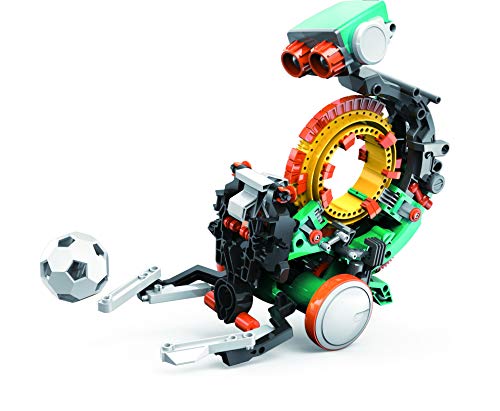
The Teach Tech Mech 5 Mechanical Coding Robot stands out as an excellent choice for young beginners interested in hands-on STEM learning. I love how it combines mechanical building with simple coding, encouraging kids to experiment with tasks like throwing, lifting, and drawing. Its snap-on coding buttons make programming accessible, even for those new to coding. Plus, its eco-friendly design powered by water, wind, or sun teaches sustainability without batteries. At just over a foot long and lightweight, it’s perfect for small hands. Overall, Mech-5 offers a fun, educational experience that sparks curiosity and develops essential engineering and coding skills for ages 10 and up.
Best For: young beginners aged 10 and up interested in hands-on STEM learning, mechanical engineering, and coding.
Pros:
- Easy-to-use snap-on coding buttons make programming accessible for beginners
- Eco-friendly power sources teach sustainability without batteries
- Encourages hands-on building and experimentation to develop engineering skills
Cons:
- Requires 2 AAA batteries (not included), which may be an extra purchase
- Limited to basic movements and functions suitable for entry-level users
- Small size may require careful handling by younger children
Factors to Consider When Choosing Robot Coding Kits

When selecting a robot coding kit, I consider factors like age appropriateness and skill level to guarantee it’s suitable for the user. I also look at programming options and building complexity to match their interests and abilities. Educational content is important too, as it helps maximize learning and engagement from the kit.
Age Appropriateness
Choosing the right robot coding kit depends heavily on the child’s age and developmental stage. Look for kits labeled with clear age ranges, such as 5+ or 8+, to match their abilities. For younger children, select kits with simple, age-appropriate complexity to prevent frustration and encourage learning. Consider the size and design of the robot parts—safe, manageable pieces are essential for small hands and motor skills. Also, check if the kit offers beginner-friendly instructions, tutorials, or guided activities suited to their learning level. Keep in mind that kits intended for older kids might include small parts or advanced coding concepts unsuitable for younger children. Choosing appropriately guarantees the experience remains fun, safe, and educational.
Skill Level Compatibility
Matching the skill level of a robot coding kit to a child’s current abilities helps guarantee they stay engaged and learn effectively. I recommend checking if the kit’s age range aligns with the child’s development and skill set. For beginners, look for options with drag-and-drop programming or simple assembly to ease them into coding. For more advanced kids, verify if the kit supports languages like Python, JavaScript, or Arduino, which challenge their skills. It’s also smart to choose kits that can grow with the child, offering scalable difficulty levels or expandability. Clear instructions and tutorials tailored to their current understanding help make certain a smooth learning curve. Picking the right fit keeps the experience enjoyable and encourages continuous progress.
Programming Options
Selecting the right programming options for a robot coding kit is essential because it directly impacts how easily a child can start coding and progress. Kits offering block-based, drag-and-drop interfaces are perfect for beginners, making it simple to learn fundamental concepts without prior experience. For more advanced learners, options supporting text-based programming languages like Python or C provide deeper control and complexity. Compatibility with platforms like Arduino or proprietary apps can expand a robot’s capabilities and future learning potential. Additionally, many kits include pre-set challenges to build confidence and understanding through interactive activities. The ability to upgrade or customize programming features guarantees a gradual learning curve, allowing kids to move from basic commands to complex algorithms at their own pace.
Building Complexity
Building complexity in robot coding kits varies widely, from simple snap-together models to intricate projects that demand advanced assembly skills. I consider this a key factor because it influences how much challenge and learning the kit offers. Kits with higher complexity usually include multiple modules, sensors, and programmable features, which push users’ engineering understanding further. The number of parts and the variety of possible models also reflect the level of complexity, helping me gauge if a kit suits a beginner or an experienced builder. As the complexity increases, so does the need for tools and adult supervision, making assembly more demanding. Picking the right level ensures the kit remains engaging without becoming frustrating, allowing for both fun and meaningful learning.
Educational Content
Have you ever wondered if a robot coding kit provides enough educational support to maximize learning? It’s vital to choose a kit with extensive educational content like tutorials, lesson plans, or video courses that guide structured learning. I look for kits that introduce key programming concepts such as block-based coding, Python, or Arduino, enabling kids to develop skills progressively. Activities and challenges aligned with STEM principles are essential to reinforce engineering, electronics, and coding fundamentals in an engaging way. I also check that the material matches the child’s age and learning level to guarantee the right balance of challenge and fun. Additionally, extra resources like storybooks, activity cards, or guided projects can inspire creativity and deepen understanding, making learning both effective and enjoyable.
Expandability Features
When choosing a robot coding kit, considering its expandability features is essential for ensuring long-term growth and versatility. I look for kits that support adding new modules, sensors, or parts to increase complexity and functionality over time. Kits with open-source systems and compatibility with third-party components let me customize and upgrade my robot easily. The ability to shift from beginner-friendly block coding to more advanced programming languages like Python or Arduino makes the kit future-proof and enhances learning. Multiple connection ports, such as XH2.54 or JST connectors, simplify integrating new sensors or modules. A modular design that allows different configurations encourages ongoing exploration and skill development beyond initial assembly, making the kit a valuable investment in my robotics journey.
Safety Standards
Choosing a robot coding kit requires careful attention to safety standards to guarantee a secure and enjoyable experience. I always check if the kit complies with certifications like ASTM, CE, or UL, ensuring it meets strict safety requirements. It’s essential that all electrical parts, such as batteries and wiring, are securely enclosed and insulated to prevent shocks or short circuits. I also look for non-toxic, BPA-free, and environmentally safe materials, especially since kids often put things in their mouths. Small parts, screws, and detachable components should be designed to minimize choking hazards, particularly for younger children. Ultimately, I review the manufacturer’s warnings and age recommendations to make sure the kit matches the child’s developmental level, reducing misuse risks and promoting safe, creative fun.
Frequently Asked Questions
What Safety Features Are Included in These Robot Kits for Young Children?
These robot kits prioritize safety with features like rounded edges, non-toxic materials, and secure battery compartments to prevent accidental access. They also include simple, clear instructions to guarantee proper assembly and use. I always recommend supervising young children during play, but these kits are designed with safety in mind, making them a great choice for fostering creativity without compromising safety.
How Compatible Are These Kits With Various Operating Systems and Devices?
These robot coding kits are generally very compatible with various operating systems like Windows, macOS, iOS, and Android. I’ve found most kits offer dedicated apps or web-based platforms that work seamlessly across devices, including tablets and smartphones. Just make sure to check the specific compatibility details before purchasing. Overall, they’re designed to be user-friendly and accessible, so you can start coding and building without worrying about device limitations.
Do These Kits Support Multiplayer or Collaborative Coding Activities?
Yes, many of these robot coding kits do support multiplayer or collaborative activities. I love how they encourage teamwork by allowing multiple users to program and control robots simultaneously. Whether through shared apps, online platforms, or integrated features, these kits make collaborative coding easy and fun. They’re perfect for group projects or classroom settings, helping kids develop communication skills while enhancing their coding creativity.
Are There Advanced Versions Available for More Experienced Young Coders?
There are advanced robot coding kits designed for experienced young coders that are nothing short of extraordinary. These kits offer complex programming challenges, customizable features, and robotics that can be fine-tuned to perfection. They’re perfect for those ready to take their skills to the next level and push the boundaries of innovation. If you’re enthusiastic to grow and experiment, these kits will truly blow your mind and fuel your passion for robotics!
What Are the Recommended Age Ranges for Each Kit’s Complexity Level?
I recommend checking each kit’s packaging for age guidelines, as they typically range from 5 to 16+ years. Beginners usually start with kits designed for ages 5-8, which focus on basic concepts. More complex kits suited for ages 9-12 introduce programming skills, while advanced kits for teens often include robotics and coding challenges. Always choose a kit that matches the child’s current skill level to keep it fun and engaging.
Conclusion
Choosing the right robot coding kit can totally transform your kid’s world—it’s like giving them a tiny genius to carry around! Whether they’re building dinosaurs or racing cars, these kits open creativity and tech skills faster than a rocket. Trust me, once they immerse themselves, they’ll be the next coding superstar, leaving the world of toys in the dust. So, pick one and watch your kid release their inner tech wizard—it’s an epic adventure waiting to happen!